






Review: Antelope Audio Discrete 8 Oryx & Zen Quadro Synergy Core
Two fresh additions to the Synergy Core platform serve up power and innovation.

2 April 2026
It’s been about 13 years since I last fostered a young Antelope Audio device. Back in the early 2010s Antelope was known for its master clocks and stereo devices but even then the Orion32 demonstrated a philosophical commitment to studio problem solving and a design focus on programmable cores. I’m not sure much has changed; with Antelope’s Galaxy and Orion product lines continuing to offer extremely high channel counts – per rack unit and interface connection – and exploiting onboard DSP and FPGA power to propel the Synergy Core real-time processing platform. All of these features have come at a cost, and to-date it’s perhaps only the Discrete 4 and 8 Pro interfaces that have served the top end of the producer or prosumer end of the market.
With the Discrete 8 Oryx (on face value, a USB-only update on the 8 Pro), Zen Quadro, and Zenith 2 (not reviewed here) there would appear to be a shift in this balance. Offering DSP-powered realtime vintage hardware emulations, similar to Universal Audio’s Apollo line, these new Antelope Audio USB 2.0 interfaces bound into a price point between recently-reviewed SSL and Audient interfaces and the UA competition. The Discrete 8 Oryx is a 1U, externally-powered interface featuring the now standard complement of eight mic preamps/line inputs and dual ADAT I/O expansion. The smaller Zen Quadro is an extremely lightweight, desktop bus-powered USB interface featuring four mic preamp/line inputs, one ADAT input expansion port and a flexible second USB interface connection.
NEED TO KNOW
Antelope Audio Discrete 8 Oryx
USB Audio Interface

NEED TO KNOW
Antelope Audio Zen Quadro
USB Audio Interface

YOU SAY ANTELOPE, I SAY ORYX
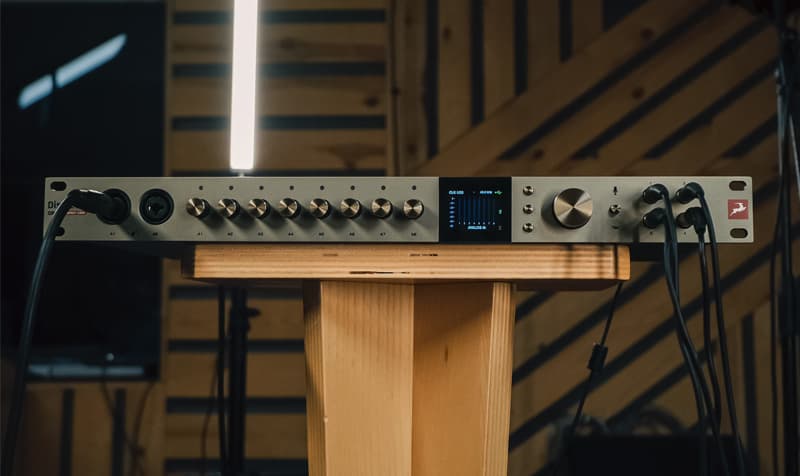
Excluding the obvious absence of a Thunderbolt interface, the Direct 8 Oryx has maintained much of the feature set and layout of the older Direct 8 Pro. The removal of individual hardware controls for the headphone outputs has allowed for the doubling of available outputs, from two to four. A master (stepped) rotary encoder (with push button) combines with three, clicky function buttons and the colour screen to facilitate level control and most device configuration options, while eight smaller stepped pots drive each of the mic preamp/line input channels, in 1dB increments. Another small button gives front panel control of talkback, assignable from an internal microphone or any of the external inputs.
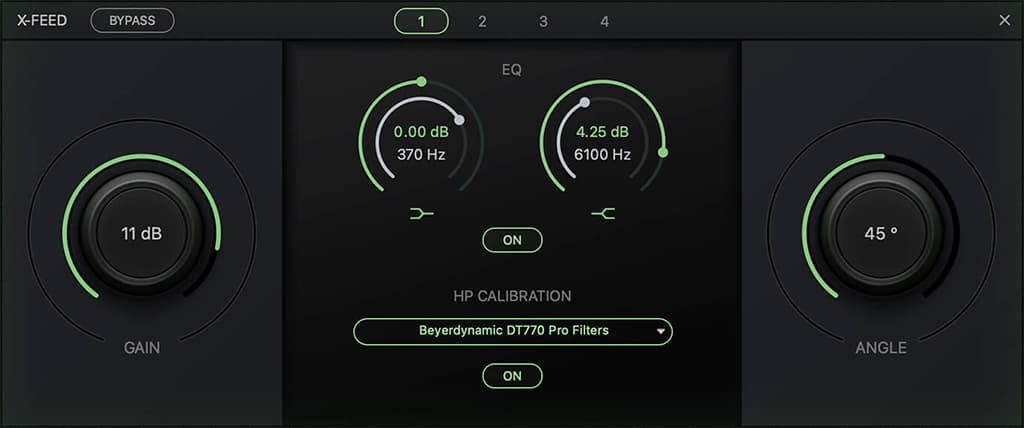
Worthy of note is the extended headphone configuration options. Stretching beyond individual level control, each of the four outputs feature X-Feed, calibration and high and low shelving EQ. X-Feed is a software based crossfeed system, allowing headphone listeners to more closely replicate the stereo experience of sitting in front of a pair of speakers. Both the angle (0 degrees being mono, 90 degrees offering the widest channel separation) and crossfeed level can be set, per headphone send, and I found myself settling on an angle of 53 degrees and a level of +2dB. I’m a fan and found this easily-switchable function useful, particularly during tracking. X-Feed definitely counters that inside-of-body headphone experience that can be unsettling for many. A headphone calibration option is provided to compensate for the tonal variation in headphone makes and models. With a selection of profiles provided for Beyerdynamic, Sennheiser, Sony and Pioneer models. Neither of my headphones (AKG K271s or Audio-Technica ATH M70x) were supported, so I was unable to put it to the test.
EVERYTHING ZEN
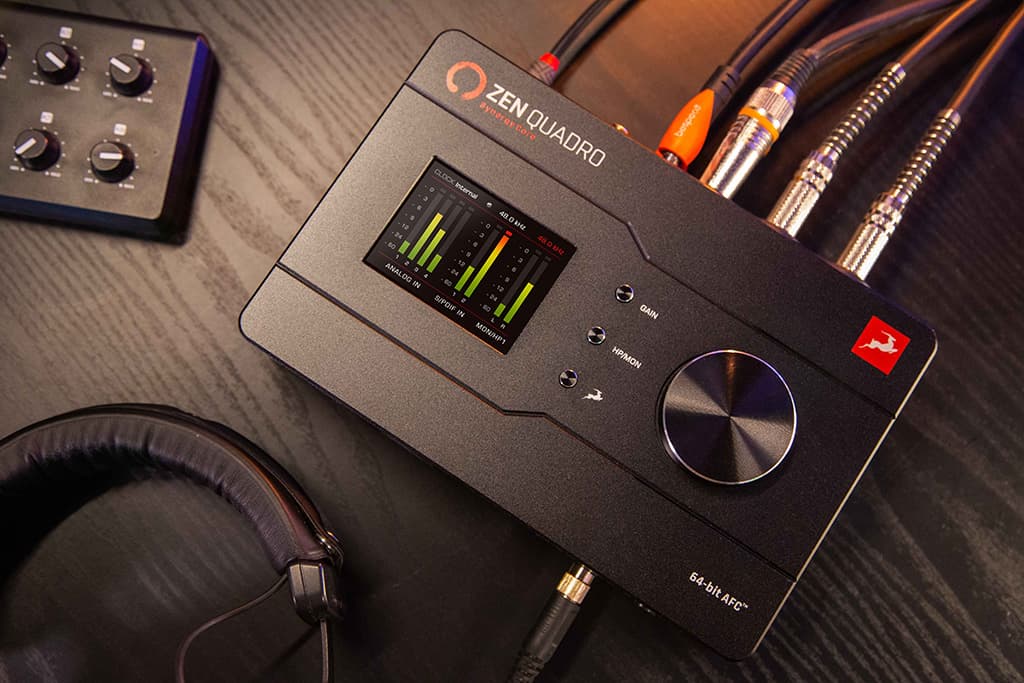
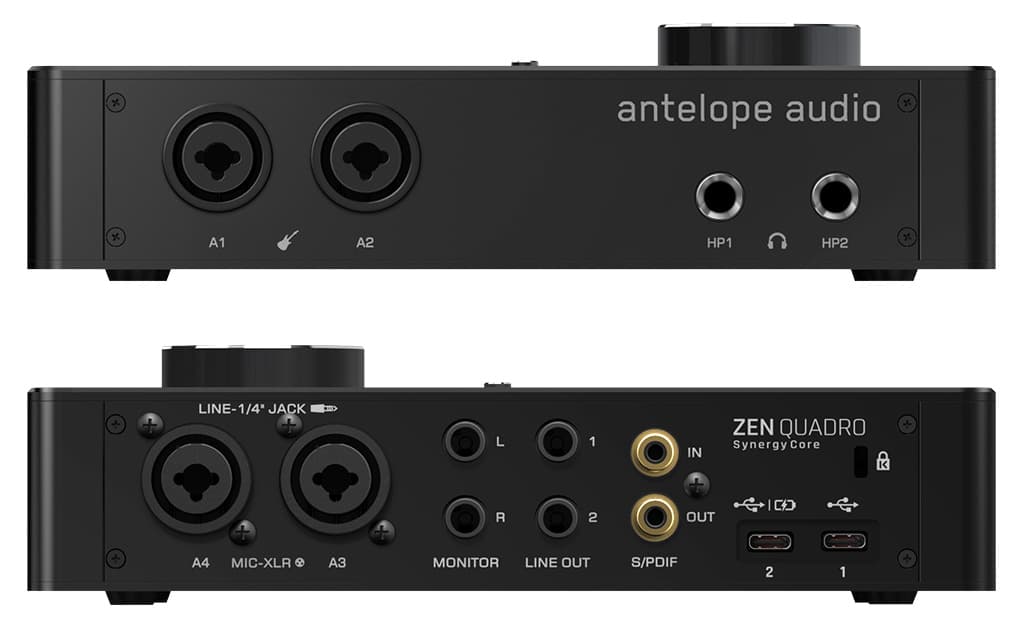
On face value, the Zen Quadro shares much with the Oryx (Synergy DSP/FPGA Core, Discrete six-transistor preamps, Class-leading AD/DA conversion with up to 130dB of headroom, proprietary 64-bit Acoustically Focused Clocking and jitter management) but, unlike the Discrete 4 Pro, it is not simply a channel-limited repackage. A portable USB bus-powered desktop interface, the Quadro delivers four mic/line channels (two with switchable Hi-Z inputs), two pairs of balanced TRS monitor/line outs, two headphone amplifiers (without the advanced customisation capabilities), ADAT input, and stereo S/PDIF I/O. While the Quadro eschews some of the professional studio features, such as the Reamp channels, wordclock and bi-directional ADAT expansion, it compensates with a unique trick all its own: a second USB interface port.
The main USB interface (USB 1) is the primary power source for the Zen Quadro (5V >1.5A) and offers full access to the 16 channel Windows or Mac interface (ASIO and Unified drivers recommended) and software control panel. The additional USB-C port provides a class-compliant stereo interface supporting Windows, Mac, Apple (via the appropriate cable and/or camera kit) and compatible Android devices. Android audio can be pretty hit and miss at the best of times, so don’t be surprised if it doesn’t work for you – it didn’t with my Samsung A54. What this means is that the Zen Quadro is capable of serving as a standalone interface for either a computer or mobile device (with an appropriate power supply connected to USB 1) or it will allow you to freely route audio between two devices connected simultaneously. They don’t even need to share the same sample rate!
Featuring a much larger screen than the Oryx, and supporting front panel control of all settings, including monitor mixes (if, curiously, only the first eight of 16 possible channels), the possibilities for this dual interface are extensive. During testing I used an iPad touchscreen to trigger stings and pre-recorded content for a podcast recorded onto a laptop via the Quadro’s mic preamps. I also experimented with live remixing an Ableton Live laptop performance through an iPhone running Koala Sampler and back into Ableton. Finally, and perhaps most simply, I was able to connect a second laptop to capture a backup audio stream during the recording of a conference proceedings. While I personally would love to see the class-compliant interface extended beyond stereo I/O to at least four or eight channels (as some other manufacturers support), it’s definitely an excellent inclusion and I imagine will be a major motivator for those starting to feel a yen for Zen.
CONTROLLING SYNERGY
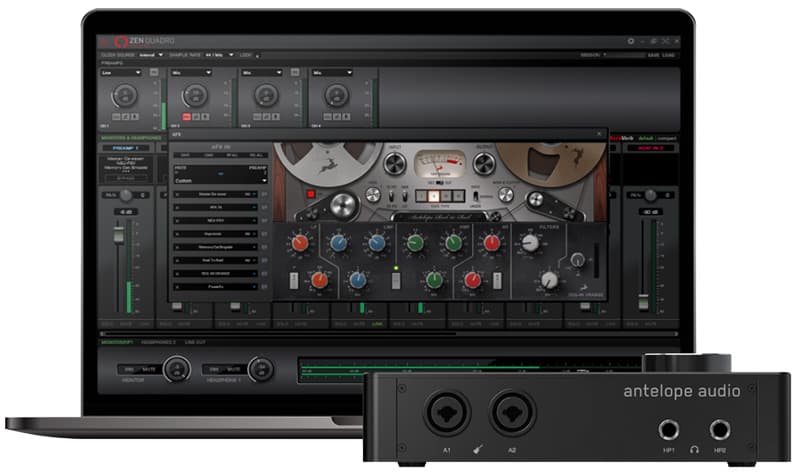
Initiated from the Antelope Launcher, both devices share a similar Control Panel window design with some important distinctions, perhaps reflecting their expected use/user. Input channel gain and configuration are covered by a top row of virtual knobs with stereo channel linking options and access to pop-out mic modeling dialogs, where available. Likewise, configuration settings for parameters such as sample rate, clock source, dim amounts, and switchable DC-coupling of I/O channels (perfect for interacting with your modular synths’ control network) reflect a universal Antelope approach. Meters tabs provide quick and clear access to all hardware and software I/O, although I’d love to see the ‘meter section’ buttons, used on the Zen Quadro interface, also maintained for the larger interface where drop-down page selection is far slower to navigate. Both include 37 bundled near-zero latency effects (expandable to over 50 from the Antelope Audio online store) for use when tracking and/or monitoring. You’ll find a range of preamp, classic EQ, dynamics, modulation and guitar and bass amplifier and cabinet emulations to satisfy most requirements. While a single instance of Antelope’s highly-featured Aura reverb is incorporated into the monitor mixing panels of both, I’d love to see at least a couple of simple time-based channel effects included in the bundle.
Chains of up to eight plug-ins are supported per processing strip, with Zen Quadro able to handle six mono channels of processing, as compared to the Oryx’s 16. Channel linking enables stereo processing, and assignable slot inputs means that processing pairs are not tied to specific hardware pairs. Once inserted, AFX strips appear in a separate pop-out window that can at times blend in a little too much with the dark background of the main Control Panel. While this is great for those running multiple monitors I found the additional windows slowed my workflow, particularly on the Quadro where you can end up with six different AFX windows open. The Oryx employs a single pop out with tabs for each of the AFX channels and this was far easier to manage.


FADER LAYERS OR DISCRETE MIXERS
The greatest distinction between the two Control Panel interfaces is the way they handle routing and monitor mixing. The Zen Quadro ties its three-fader-layer, 16-channel monitor mixer, to fixed stereo hardware outputs: Monitor/Headphones 1, Headphones 2, and Line Out. Subsequently, you can’t access these outputs via a direct software patch point. The outputs of the first two mixes can be looped back for recording/processing on either USB connected device or assigned to the S/PDIF output. Unlike many other small format interfaces the 16 mixer inputs, shared across all three mixes, are freely assignable from the analogue and digital hardware inputs, mic emulation outputs, software returns (from either of the two available USB devices) and the internal oscillators. Reverb is sent per input, pre the fader layers, with separate returns available for the two Headphone-associated mixes. Plug-in chains are available on the first six mixer channels, with these assignments and bypass settings mirrored to the first six USB 1 driver inputs. It would be preferable if this connection was not hardwired, nevertheless, with 16 software inputs feeding your DAW, it’s easy to create duplicate recording channels for both direct and processed channels. On the Quadro, signal routing is handled from dropdown menus above each of the device meter channels. While straightforward and powerful, there are lots of tab and menu jumping required.
Meanwhile, the Discrete 8 Oryx is a mixing and routing powerhouse. Routing is handled in one of two ways: a multicoloured, block-based view allows the user to see all available and assigned connections, immediately. Channel groups can be recoloured and all sources renamed (stick to fewer than seven or eight characters); with labels applied throughout the Control Panel. To create a patch, simply drag an input block (or multiple selected blocks) onto an output block/s. A pop-out matrix window facilitates rapid patching and access to further renaming of output destinations. Device routings can be saved as presets, independent of broader Session and Hardware snapshots. Unlike the Quadro, Oryx’s Mic emulation channels; AFX chains; four, distinct 32 input channel monitor mixers; and monitor mixer returns are all discrete, unassigned sections. This allows the routing of single sources to multiple locations, for one mixer to feed another, or one mix to feed multiple outputs. The ability to submix drum mics to a stereo pair and then feed this group to the main monitor mix is one obvious application. It also avoids the hard patching of any processing channels to software inputs or mixes to hardware outputs. Again a single Aura reverb engine is included, this time as an integrated send within Mixer 1. Frustratingly, while Monitor mix output meters have been included within the Meters tab, they’re absent within the Mixer views – an oversight that should be rectified swiftly.
SUMMING UP
Perhaps, most importantly, these two new Antelope Audio interfaces sound great, with latency performance and audio stability to match. The quality of the onboard real-time effects open up recording and monitoring options that would otherwise require rack loads of gear. Particularly in the case of the Discrete 8 Oryx, the routing and mixing options extend far beyond those offered by some of the competition. Notwithstanding, there is some room for improvement, with inconsistencies between the Zen Quadro hardware- and software-based controls (monitor mix channel count and Hardware preset access, in particular). I’d also love to see an entirely standardised approach to the Control Panel, drawing on the most streamlined UI options.
Antelope mentions remote network and app control for both devices, but in my experience these features are still a work in progress. If they nail the app control aspects it would be big tick in the plus column for anyone considering these interfaces.
Antelope Audio continues to demonstrate a highly-individual approach to interface development and studio problem solving. I’d love to see a secondary class-compliant multichannel USB interface become standard on all future devices and would hope that their reprogrammable cores will continue to address most user quibbles.
Fans of Antelope Audio, and there are many, will know what I’m talking about. Antelope is well known for leaping ahead with exciting features to match the great sound its products have always enjoyed. Sometimes the leaps require follow-up engineering to nail everything down. With that, users are often the beneficiaries of crazy-good features but sign on to some niggles along the way. Rusted on fans are happy to go on the journey. I’ve no doubt these two new products will convince many more to come for the Antelope ride.






RESPONSES