



AI, DAWs & Audio 3
This instalment explores the possibilities an AI-assisted DAW could offer novice engineers and recording musicians, starting with an on-board 'Mic Expert' that helps with microphone choice and placement.

By Greg Simmons
19 May 2026
The first instalment of this series suggested that AI developers should be shifting their focus away from tools that nobody asked for [digital fidget spinners] and towards the needs of potential users; asking what is needed, what is wanted, and what we’re willing to pay for.
I’m not in the business of dissecting rodents – but even if I was, I couldn’t give a rat’s ass about what AI can create on its own. I’m interested in what it can help me create, how it can help me earn the same money for less work, and how it can help me earn more money for the same work. Why would I invest time, money and effort into it otherwise?
Steering AI developers and their spotty-faced ilk in the right direction is the pro-active choice for keeping an established audio career moving forward. Remember: if you’re not part of the machine, you’re part of the road. It’s your future, no fate but what you make.
The second instalment focused on how an AI-assisted DAW could be helpful to established mix engineers, but acknowledged that the solutions on offer would reduce the need for assistant engineers in the mixing studio – thereby reducing the opportunities for novices to set out on the traditional learning path. However, as we’ll see in this instalment, an AI-assisted DAW could provide opportunities for novices to bypass the traditional learning path (a long-hour low-wage ‘apprenticeship’) by accelerating and broadening their learning at their own pace – assuming the Producer Profiles concept discussed in the next instalment becomes a reality.
Another group of people who would, and already do, benefit from an AI-assisted DAW are…
RECORDING MUSICIANS
Unlike the established mix engineers discussed in the previous instalment (professionals who earn an income from mixing music) we’ll define the recording musician as an enthusiast who has purchased all the equipment needed to record, mix and upload their own music. They’re typically set-up in a spare room at home with a handful of mics, an audio interface with two or four inputs, some sheets of sculpted foam stuck on the wall, and a decent pair of headphones supplemented by a pair of desktop speakers. They use samples for instruments that are too difficult to record in their room (e.g. drum kit, piano, symphony orchestra), and typically only play a couple of instruments themselves – such as guitar and vocals.

Coincidentally, they’re the same people mentioned in the first instalment of this series who are already benefitting from Logic Pro’s AI-based Session Players – which currently consist of a drummer, a bassist and a keyboardist. As mentioned before, the Session Players have been trained on human session players, and create nuanced performances by analysing the song’s structure, tracking the chords, and providing a musical backing performed with the feel, phrasing and techniques of human performers. Adding ‘good enough’ drums, bass and keyboards has never been easier for the recording musician.
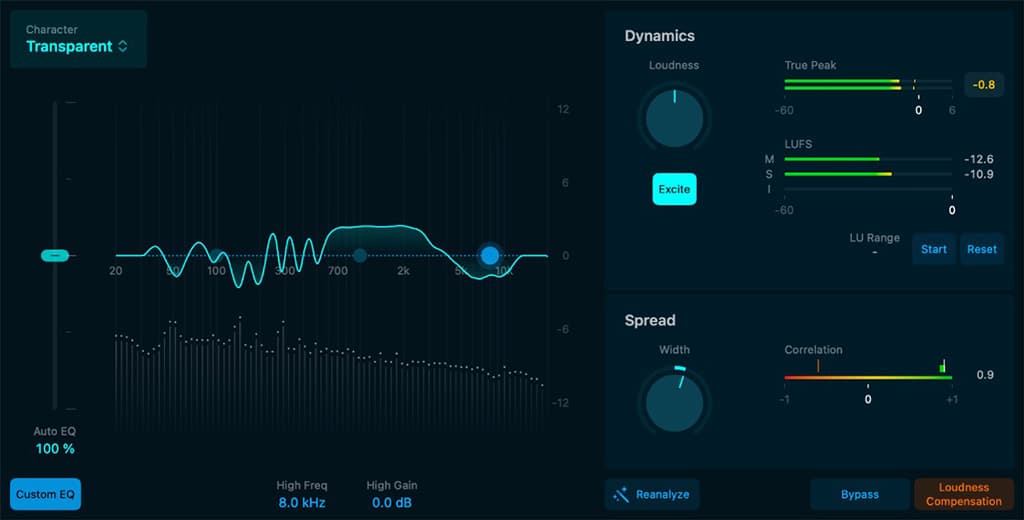
Another good use of AI in Logic Pro is its Mastering Assistant. According to Apple Intelligence: The Mastering Assistant is an AI-powered tool designed to simplify the mastering process for musicians. It automatically analyses the mix, applying optimised equalisation (EQ), compression, and limiting to enhance clarity, balance, and loudness. This ensures a polished, professional sound without requiring deep technical knowledge. The Mastering Assistant streamlines workflows, maintains consistent audio quality, and provides confidence that tracks are ready for streaming platforms – making it an invaluable resource for recording musicians aiming for professional results. It’s going to affect a lot of Fiverr-style ‘mastering engineers’ (some positive, some negative), but in the process it will make the AI mastered version the budget option and the experienced human mastered version the premium option – a recurring theme throughout this series. If a time-rich/money-poor musician wants to get their music onto a streaming service, the Mastering Assistant will ensure it conforms to the level requirements of the platform while also sounding acceptable. However, it’s not going to apply the ‘big picture’ magic glue that a human mastering engineer applies over an entire album in a barely perceptible song-by-song manner – especially things that require the use of expensive analogue equipment that AI is deaf, dumb and blind to.
AN AI-ASSISTED DAW FOR RECORDING MUSICIANS
Logic Pro’s Session Players and Mastering Assistant are both solid examples of AI-assisted DAW features that are already benefitting recording musicians, but there’s much more that could be done because there’s a massive gap between capturing sampled sounds (Session Players at the beginning) and having a mix ready for dissemination (Mastering Assistant at the end). In between those two processes additional sounds need to be recorded, often with the use of microphones – which requires entirely different skills compared to recording samples with Midi. After recording and before mastering, the individual sounds need to be mixed down – which is another entirely different skill, as discussed in the previous instalment and also throughout my Mixing With Headphones series.
To further understand how an AI-assisted DAW can help recording musicians we need to understand the challenges that face recording musicians. The best way to do that starts with this very Zen subheading…
Be The Recording Musician
I’ve been a professional audio practitioner, educator and writer for decades. It’s been a long time since I felt challenged by recording equipment, recording terminology, or the recording process – which puts me a little out-of-touch with the novice. To gain an appropriate perspective I’m going to call a friend who recently invested in equipment to record and upload his music. He’s somewhere near the bottom of the learning curve but he’s finding solutions as he goes. His name is David, but being an Aussie means his friends call him Davo (pronounced ‘Day-vo’). Let’s have a chat with Davo…
GS: What made you want to become a recording musician?
DO: As you know, I’ve been in and out of studios as a musician and session player for years. I’ve always known a good sound when I hear one, so naturally I thought, “this recording stuff can’t be hard; I’ll just record a bunch of good sounds, move the faders around until they all sit together, and… done!” Well… [Clears throat humorously.] I bought the equipment, but here’s the thing: the marketing went into eye-glazing detail about what the computer needed to run the software, but it said nothing about what I needed to make recordings that sounded ‘just like the pros’! The advertisements told me, “With this equipment I can make recordings like the pros!”. What it should’ve told me is “With this equipment and 10 years of recording experience I can make recordings like the pros!”
GS: Thanks for saying the quiet part out loud! To be fair, they’re selling gear, not experience. Mentioning ‘experience’ as a requirement would be a great big negative to potential buyers like you…
DO: I know, right! I honestly thought I’d just point a mic at an instrument, mess about with the knobs until I got a good sound – just like I do with my effects pedals – and record it. I quickly learnt the difference between knowing a good sound when I hear it, and creating a good sound with a mic and a channel strip. The dream of recording, mixing and uploading a song over a weekend vaporised as quickly as a vintage ribbon mic hit with a blast of phantom power.
GS: An apt analogy… But you’re making pretty good recordings already. What did you do?
DO: It’s a secret! [laughs] Nah, actually, it started when I realised that the main sounds I’m recording are always the same: my voice and my guitars. Those are the tools I write my songs with; for most of the other stuff I use samples. One of the best investments I made was not in gear but in time: I paid a real professional sound engineer – the kind who’s too busy to run a Youtube channel – to visit my studio for a few hours.
GS: No names please! He might be reading this…
DO: He might be writing it! [laughs] Anyway, he brought along some microphones and, after I reimbursed the costs of repairing his vintage ribbon mic, we worked out the best sounding places in my room to play guitar and sing, the best places to stick the absorption on the walls, and the best mics for my budget and where to put them.
GS: Smart approach! What mics did you settle on?
DO: I’ve got a Røde NT2A for my vocals; it came packaged with a shock-mount, a pop filter and a cable – a really good deal. It sounds good on my voice, and looks super ‘pro’ sitting in the shock-mount with the pop filter fitted. When I sit in front of it and put on my headphones, I want to sing. That’s a good thing, right?
GS: Tools that make you want to use them are always good. What else?
DO: I’ve got a pair of Newman K…
GS: It’s pronounced ‘Noyman’…
DO: Oh, yeah… I’ve got a matched pair of Noyman [Neumann] KM184s for my acoustic guitar. I only needed one, but the pro guy said it’s worth getting the matched pair deal in case I want to record my acoustic guitar in stereo. Maybe I’ll try that one day, but at present it’s all set up nicely for me. When I’m sitting there so that the tip of my nose is almost touching the pop filter, the NT2A is at the right distance for my voice and the KM184 is in the right spot for my acoustic guitar.
GS: A physical preset! What else do you have?
DO: I’ve got a Royer R121 for my guitar amp…
GS & DO: Instant electric guitar sound! [laughter]
GS: Four mics, four inputs on your interface. Optimum!
DO: But it gets better… That pro guy set-up the interface’s controls so my recordings aren’t full of noise and distortion, and adjusted some plug-ins on my DAW so I consistently get my vocal sound, my acoustic guitar sound and my electric guitar sound. That system stays permanently set up; I can go into my studio whenever inspiration hits, power up, start recording guitars and vocal, and then, with the Session Players in Logic Pro, flesh out the idea with drums, bass and keyboards and turn it into a song. It’s very satisfying, and… addictive.
GS: You’ve got the ‘capture the musical idea’ part of the process sorted. Any stumbling blocks?
DO: Heaps, because I’m still new to this. My interface has four inputs, so there’s always a spare input for recording other things without disturbing my existing set-up. I’ve got the other KM184, but I also have an old Sennheiser MD421 gifted to me by my sound engineering friend; it’s obviously taken a few hits from drum sticks and is held together with gaffer tape, but he assured me it was a good choice because “it’s not too fussy about placement and provides an acceptable sound on just about anything”.
GS: That’s a versatile set of mics! Whether you realise it or not, your engineering friend did you a big favour. He solved your problems while also leaving you with at least one of each ‘flavour’ of microphone and the ability to record in stereo. You’ve got a large dual diaphragm multi-pattern condenser, a matched pair of small single diaphragm cardioid condensers, a ribbon and a very forgiving dynamic. There’s not much you cannot record with those options…
DO: I never thought of it that way! [pleased realisation creeping over his face] Anyway, it’ll be a while before I’m gonna move any of my three main microphones – not even take them off their stands or change their angles! They all sound really good exactly as they are….
But when dealing with unfamiliar instruments I’m back to square one on mic choice, mic placement and the interface; asking my collaborator to play the part over and over again while I’m trying different mics and positions, turning a ‘gain’ knob marked in ‘dB’, fiddling with a ‘-20dB’ switch that does nothing but make me adjust the ‘gain’ knob again, pressing that switch with the bent line drawn on it just in case it makes a an audible difference, and somehow get everything adjusted so it sounds okay and nothing goes into the red on the DAW. All that ‘dB’ and ‘Hz’ stuff makes my eyes glaze over, but sometimes I get it right. I’m slowly making progress. I wish adding other instruments to my recordings was simply a matter of plugging in a mic and pressing ‘record’.
GS: So you’re getting stuff done but there’s still some learning to do…
DO: Yeah, especially with miking and mixing. I should mention, though, that I use Logic Pro’s ‘Mastering Assistant’ at the end and it really makes my amateur ‘fader’ mixes sound better. It’s just like using a guitar effects pedal; two knobs and a button! I rarely change anything, I just let it get my mixes ready for streaming so I don’t have to bother with all of that tech stuff.
GS: Right! Anything else?
DO: Actually I’ve gotta get a move on… As part of the deal for spending money on the studio, the missus made me lock in weekly ‘quality time’ with the kids. Today I promised to take them flying kites, and the wind is picking up. Maybe I’ll get a song idea while I’m out and about ‘doing more with my life’ – as the missus likes to put it…
GS: No worries Davo. Thanks for your story, and have fun flying kites with the kids!
WHAT HAVE WE LEARNT?
Apart from an easier interface to deal with gain structure [see ‘A Smart Interface’ in the next instalment of this series], how could an AI-assisted DAW help a novice recording musician like Davo?
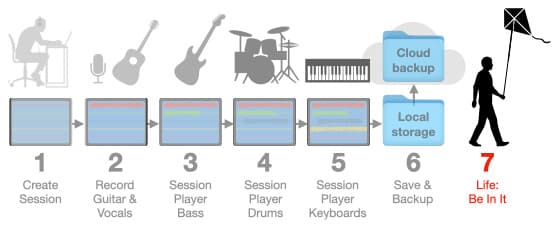
The illustration below shows Davo’s typical recording workflow. He creates a new session (1), records his sounds (2 to 5), saves the session and wisely backs it up to cloud storage (6), and then fulfils his side of the deal with his missus (7).
His biggest challenges throughout the process are mic choice/placement, and mixing. How can an AI-assisted DAW intended for a recording musician like Davo help with these things? Let’s start with mic choice and placement…

MIC EXPERT
In the second instalment of this series we discussed the training required to make an AI-assisted DAW suitable for mix engineers. We saw that the AI component should be pre-trained with the objective fundamentals of music, acoustics, psychoacoustics, audio signal properties and so on, along with an awareness of ‘understanding the work’. We also went into detail about the training process itself – including the pre-training, validation, and RLHF (Reinforcement Learning with Human Feedback) – required to get the AI-assisted DAW ready for the market. Once purchased, the AI-assisted DAW would continue its learning through user interaction and analysing the user’s session files. In this way, each AI-assisted DAW ultimately becomes an extension of its user’s techniques and aesthetics. It learns how the user likes to do things, and it learns the kinds of tonalities, effects and levels the user prefers.
We can expand the training process to make the same AI-assisted DAW useful to recording musicians – which also makes it useful to professional recording engineers. Let’s say we added the objective fundamentals of microphones to the pre-trained information mentioned above. This additional information gives the AI an objective understanding of microphone specifications such as Frequency Response, Polar Response and Off-Axis Response, Sensitivity, Max SPL, Self-Noise, and Proximity Effect, along with an understanding of the objective and subjective differences between ribbon mics, dynamic mics, and condenser mics – including their typical applications and the general consensus on their tonalities. If structured appropriately, this information will provide the knowledge base required for a microphone Expert System to operate within the AI-assisted DAW.
What is an Expert System? It’s a term that dates back to the late 1960s, gained prominence in the 1980s, and is widely acknowledged as the first widely-used form of AI. Expert Systems were behind the ‘Wizard Technology’ commonly touted in the 1990s and into the early 2000s, when some audio, photographic and video processing apps and tools had become so complex that novice users needed guidance from the ‘Wizard Technology’ to get started. According to Apple Intelligence:
An Expert System is a computer program designed to mimic the decision-making abilities of a human expert. It operates using an inference engine that applies logical rules to a structured knowledge base, often using ‘if-then’ statements, e.g. IF [the problem is this] THEN [the solution is this]. This approach allows the Expert System to analyse information, draw conclusions, and provide expert-level advice or diagnoses on specific topics. By simulating human reasoning, Expert Systems assist users in solving complex problems, offering recommendations based on stored knowledge and logical processes.
With a structured knowledge base about microphone specifications, parameters and usage, an Expert System could be configured that works in conjunction with the DAW’s AI to help recording musicians choose the most appropriate microphone and placement for whatever they’re intending to record. The addition of contemporary AI capabilities takes the traditional Expert System beyond simple ‘if-then’ logic and into the realms of reasoning and subjective decision making.
Let’s call it the ‘Mic Expert’.
With enough information, the Mic Expert can deduce the most appropriate type of microphone in terms of diaphragm size and type (single or dual), polar response, and method of transduction (condenser, ribbon or dynamic). If its knowledge base also includes some of the most commonly used microphones (e.g. Shure SM57/SM58, Neumann U87, etc.) and their typical applications, it could even recommend a specific microphone make and model – although the recommendation is meaningless if the user doesn’t have that microphone. Which brings us to…
The Mic Locker
If the AI-assisted DAW contained a database of the user’s microphone collection (i.e. a ‘Mic Locker’), the Mic Expert would work in conjunction with the DAW’s AI to recommend which of the user’s mics would be the most sensible choice for the application, and provide suggestions on how to place it. By combining the ‘if-then’ logic of a traditional Expert System with the capabilities of contemporary AI and a database of the user’s microphones, the Mic Expert becomes a tool that is truly useful to recording musicians and novice sound engineers.
Davo’s Mic Locker, for example, would contain the following information:
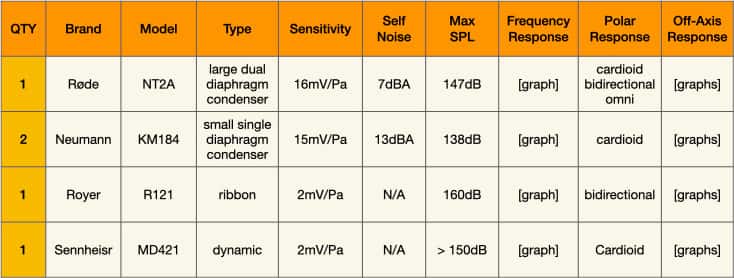
Every time Davo acquires a new microphone, he enters its make and model into the Mic Locker. The AI-assisted DAW searches the internet for all of the new microphone’s objective data, and adds it to Davo’s options.
MIC CHOICE & PLACEMENT
Given a particular miking challenge, the AI-assisted DAW could do what most AI chatbots currently do: search the internet and provide a summary of typical microphone choices for the job, supported by a handful of Youtube links demonstrating appropriate miking techniques. Sometimes this approach is helpful, other times it can lead the user down a rabbit hole that ends in a room with many doors and walls. Behind each door is a video, and for every video that says do this specific thing there’s another video that says do not do this specific thing. Meanwhile, in an attempt to resolve these contradictions, the chatbot is bridging hallucinations across the walls that cheerfully advise you to do this specific thing and do not do this specific thing at the same time – backed up with reasoning that Lewis Carroll would be proud of. Jam tomorrow and jam yesterday, but never jam today…
The Mic Expert allows us to bypass this contradictory nonsense and stay focused on recording, instead of blurring off into analysis paralysis. How? By understanding ‘why?’ A well-informed microphone choice is based on five factors: 1) the sound source being recorded, 2) the space it is being recorded in, 3) the distance it is being recorded from, 4) the presence or absence of spill and/or room sound, and 5) the tonality the user wants to achieve.
These five factors provide the Mic Expert with the objective information its Expert System needs to recommend an appropriate ‘solution’ (i.e. the type of microphone to use, not the make or model). They also provide the subjective information the Mic Expert’s AI needs to make ‘judgement calls’ such as which mic in the user’s Mic Locker is the closest match to the Expert System’s solution and the user’s intended tonality. This subjective information also becomes helpful information if the Mic Expert is asked to offer miking suggestions.
One pill makes you larger, and one pill makes you small...
— Jefferson Airplane
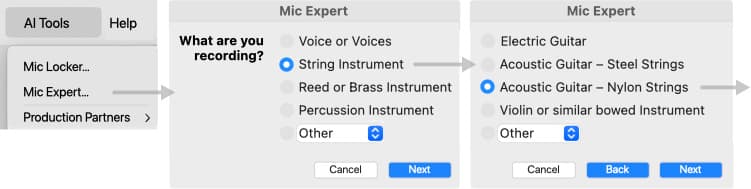
As shown above, the process begins with a series of pop-up windows that determine the kind of instrument the user intends to record and the kind of space the recording will take place in. After establishing this ‘scene setting’ information, the Mic Expert asks four questions to determine the four objective parameters behind all microphone choices: diaphragm size, diaphragm type (single or dual), polar response, and method of transduction (condenser, dynamic or ribbon). The answers to these questions provide the Mic Expert with the objective parameters that define the solution.
How Does It Do These Things?
The Mic Expert is a traditional Expert System working in conjunction with the DAW’s on-board AI. The Expert System makes the fundamental decisions, and the AI checks those decisions to ensure they’re realistic and practical.
The traditional Expert System is represented by the four decision-making diamonds running down the centre of the illustration below. Through a process of elimination, it asks four questions to determine the objective parameters that define the solution.
The grey text to the sides represents the ‘grey area’ information corresponding with each of the Expert System’s options, and is used by the AI when it’s necessary to over-ride the Expert System’s recommendations – either because a microphone with the solution’s set of parameters does not exist, or is not available to the user. In these situations, at least one of the Expert System’s recommended parameters must be changed to provide a practical solution, as we’ll see shortly.
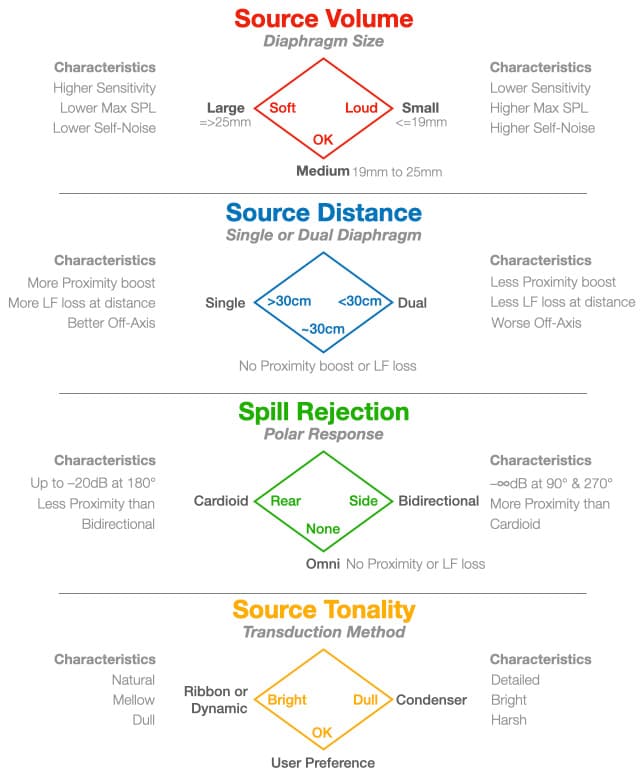
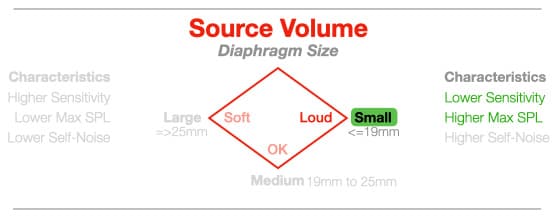
The four questions the Mic Expert asks are Source Volume (how loud is the sound being recorded?), Source Distance (close-miking or distant miking?), Spill Rejection (are there other sounds we don’t want to capture?), and Source Tonality (is the sound source brighter than desired, duller than desired, or tonally acceptable?). The pop-up window shown below asks the questions, and the user’s answers lead the Expert System to the four microphone parameters the provide the solution.
The Expert System’s solution is checked against the Mic Expert’s knowledge base to determine if it’s a practical solution, i.e. the solution’s parameters can be found together in a practical microphone. For example, from the user’s point of view there are no such things as dual-diaphragm dynamic microphones, bidirectional dynamic microphones, or omnidirectional ribbon microphones. Although those combinations of parameters might be correct solutions as deduced by the Mic Expert’s process of elimination, they’re also physically impossible or practically difficult to make and therefore don’t exist or are not readily available. When this happens the Mic Expert works with the DAW’s AI to decide which parameter is least important to meet the requirements of the recording (based on the information gathered earlier and the information in the ‘grey area’ text), change that parameter and then perform another iteration in search of a new solution.
When a practical solution is found, the Mic Expert searches the user’s Mic Locker for microphones that contain the same set of parameters as the practical solution. It does this because there is no point recommending a microphone the user does not have. If the Mic Expert only finds one match, it recommends that mic. If it finds more than one match, it recommends the one(s) that would be most suitable for the job based on its knowledge of what the user intends to record, where the user intends to record it, and the AI’s understanding of the user’s aesthetic (which is honed over time, as explained in the second instalment of this series).
MIC EXPERT IN ACTION
Let’s say we want to close-mike a snare drum. After establishing the information shown in the earlier pop-up windows, the process moves on to the questions below, which the Mic Expert uses to determine the right type of microphone: Source Volume, Source Distance, Spill Rejection and Source Tonality.
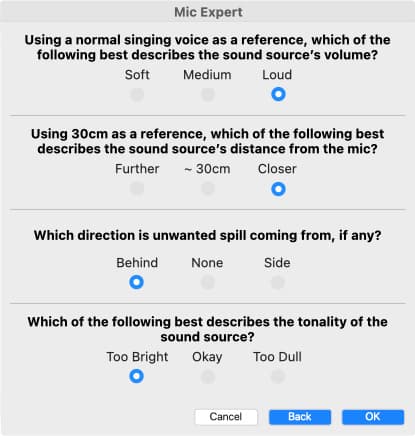
The user says the Source Volume is ‘Loud’, and the Expert System therefore indicates a small diaphragm for its higher Max SPL. The AI checks the small diaphragm’s characteristics (grey text) and determines that its higher Max SPL and lower Sensitivity are beneficial when recording loud sounds, but its lower Self-Noise is not irrelevant in this situation. [The Self-Noise parameter only applies to microphones with built-in preamplifiers or impedance buffers – which includes all condenser mics, active dynamic mics and active ribbon mics. In these situations, the microphone’s Self-Noise is the dominant source of noise with very little contribution from the preamplifier. With passive mics like dynamic and ribbons, the dominant source of noise is from the preamplifier and the amount of gain being used, and is known as EIN (Equivalent Input Noise). You can learn more about the differences between Self-Noise and EIN, and the relationship between Sensitivity and Gain, in the on-going Microphones series.]
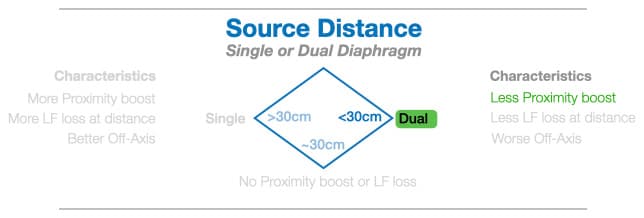
The user says the Source Distance is ‘Closer’ (i.e. less than 30cm), which is considered to be ‘close miking’ and therefore introduces the possibility of Proximity Effect if using a directional polar response. The Expert System indicates a dual-diaphragm for its lower Proximity Effect, and the AI notes that the dual-diaphragm’s reduced loss of LF and worse Off-Axis response when used at a distance are not important when close-miking. Also, the choice of a dual-diaphragm is only relevant if a directional polar response is chosen – as determined by the next answer.
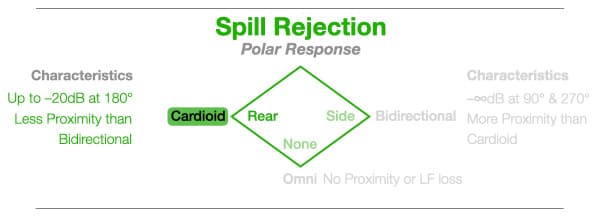
The user says the Spill Rejection is ‘Behind’ (the major cause of spill into a snare mic is typically from the hi-hat). The Expert System indicates a cardioid polar response for its strong rear null that can be aimed towards the hi-hit while keeping the front of the mic aimed at the snare. The AI abides, and notes that less proximity than a bidirectional is also advantageous.
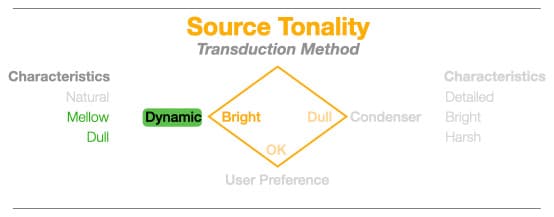
The user says the Source Tonality is ‘Too Bright’, and the Expert System indicates a dynamic or ribbon to ‘tone it down’ a little. Whenever possible, the Mic Expert attempts to even out tonalities by pairing bright sounds with dull mics, and dull sounds with bright mics. In this case the options are a ribbon or a dynamic, but the AI has erred on the side of caution and chosen a dynamic because a) it is more rugged and therefore better suited for use on a drum kit, and b) the Mic Expert’s knowledge base shows that dynamics are far more commonly used than ribbons for close-miking drums.
An Impossible Solution?
As mentioned earlier, the Mic Expert checks its knowledge base to determine if a microphone with the solution’s combination of parameters actually exists. In the example above the initial solution is a small dual-diaphragm cardioid dynamic – a combination of parameters that can’t be found in the same microphone. At least one parameter has to change. What will it be?
Change The Diaphragm Size?
According to the Expert System’, changing this parameter results in a large dual-diaphragm cardioid dynamic microphone.
From the AI’s point of view, changing the diaphragm from small to large is not a good option in this application because large diaphragms generally have lower Max SPL ratings, risking clipping within the microphone itself. Large diaphragms also have inferior Off-Axis Response, although many would consider that to be of little importance when close-miking a drum.
The AI also knows that changing to a large diameter results in a combination of parameters that don’t exist in the same microphone. It’s an impossible solution, and is therefore dismissed.
Change The Diaphragm Type?
According to the Expert System, changing from dual-diaphragm to single-diaphragm results in a small single-diaphragm cardioid dynamic microphone.
From the AI’s point of view the small diaphragm brings increased Proximity Effect, although this is easy to fix with EQ when the sound source and microphone are in fixed positions – as they would be in this situation. Furthermore, the popularity of small and medium single-diaphragm cardioid dynamics for close-miking drums suggests the Proximity Effect has become a contributor to the sound of contemporary drum recordings.
The AI notes that a small single-diaphragm cardioid dynamic microphone is a practical solution because all four parameters can be found in the same microphone.
Change The Polar Response?
According to the Expert System, changing the Polar Response results in either a small dual-diaphragm bidirectional dynamic microphone or a small dual-diaphragm omnidirectional dynamic microphone.
From the AI’s point of view, changing the Polar Response from cardioid to bidirectional or omnidirectional are not good options – both increase the spill from the hi-hats, a problem that is not easily fixed with any downstream processing. From the AI’s ‘understanding of the work’ (discussed in the second instalment), it knows that EQing the spill out of a sound usually ruins the sound itself. It also knows that gating or editing a track removes the spill when the sound is not playing, but the spill becomes audible when the sound is playing – in this case adding a weird metallic ‘chuffing’ to the snare sound.
The AI also notes that changing the polar response results in combinations of parameters that don’t exist in the same microphone. It’s an impossible solution, and is therefore dismissed.
Change The Transduction Method?
According the Expert System, changing the Transduction Method from dynamic to ribbon results in a small dual-diaphragm cardioid ribbon microphone.
From the AI’s point of view, this change would result in a more delicate microphone with an incorrect polar response (ribbon mics are inherently bidirectional), putting the null(s) into the wrong place and introducing the same spill problem described earlier.
The AI notes that this change also results in a combination of parameters that don’t exist in the same microphone (with a few exceptions). It is therefore dismissed as another impossible solution.
AND THE WINNER IS…
By changing from dual-diaphragm to single-diaphragm, the Expert System provided a set of microphone parameters that exist within a single microphone: a small single-diaphragm cardioid dynamic. The Mic Expert then checks the user’s Mic Locker in search of appropriate options because there is no point recommending a microphone the user does not have – it interrupts the creative flow and possibly stops the session.
In Davo’s Mic Locker, for example, the only mic that comes close to meeting the Mic Expert’s solution is his beat-up Sennheiser MD421 – which is actually a large single-diaphragm cardioid dynamic. Is the large diaphragm a problem in this case? The AI has checked the MD421’s specifications and seen that its Max SPL is stated as “beyond 140dB”. The knowledge base tells it that under certain circumstances, such as solid rim shots created by whipping the rim with the metal handle of a brush, a snare drum can create brief transients exceeding 150dB. Considering a) rimshots create very short transient peaks, b) large diaphragm dynamic mics generally have the slowest transient response of all mics due to the weight of their diaphragm/coil assembly, and c) the MD421’s Max SPL is stated as “beyond 140dB”, the Mic Expert deduces that the MD421 is the best solution from the mic’s that Davo has available – but includes a caveat about strong rimshots, even though their transients may be too fast for the diaphragm’s slower transient response to follow to peak SPL anyway.
While scanning Davo’s Mic Locker the Mic Expert also saw an unused Neumann KM184; it contains the right combination of parameters except it is a condenser rather than a dynamic and will therefore possibly have a lower Max SPL. Checking the Mic Locker’s database shows that the KM184’s Max SPL is 138dB. Checking the knowledge base, the Mic Expert sees that the KM184 is a good choice for placing under the snare drum to capture brightness and detail, and suggests this as a possible application. If Davo ticked both boxes indicating he was going to use both mics (the MD421 on top and the KM184 underneath) the Mic Expert would provide suggestions for placing the MD421 on top and the KM184 underneath, and it would inform the DAW to invert the polarity of the snare bottom mic. That’s one less technical issue for Davo to worry about.
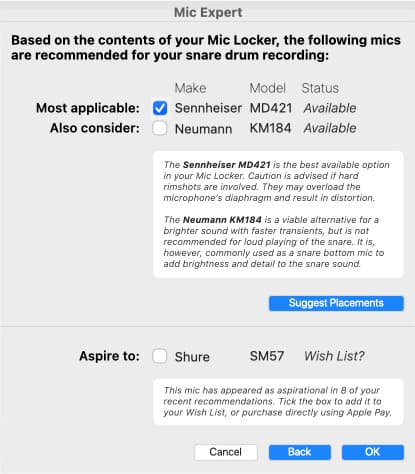
Aspirational
Note that the lower section of the Mic Expert’s recommendation window includes an ‘Aspire to:’ section. This is where it recommends microphones the user should consider adding to their Mic Locker, based on how often those microphones could’ve been indicated as solutions to the user’s requirements. In this example it has recommended a Shure SM57; it meets all the requirements of the Expert System’s current solution and a quick search of the specifications shows that it has a Max SPL in excess of 150dB. It’s a microphone that satisfies the requirements of many of Davo’s previous queries, and the knowledge base confirms it’s a mic that ought to be in every mic collection anyway.
The Cupboard Was Bare
If there is nothing suitable in the user’s Mic Locker (e.g. it only contains a handful of budget small single-diaphragm cardioids), the Mic Expert notifies the user and suggests purchasing, hiring or borrowing an appropriate microphone. If pressed to continue with what’s available in the Mic Locker, the Mic Expert will manage the user’s expectations while recommending the ‘best of a bad lot’ and suggesting placements. Speaking of which…
Placement
Having made its microphone recommendations the Mic Expert allows the user to ask for placement suggestions, in which case it does what most AI-based search engines currently do as described earlier – search the internet and provide relevant links that demonstrate appropriate miking techniques – except it does this with far more intent and focus than a simple search could provide, because it knows exactly what microphone is being used, what instrument is being recorded, the tonality of that instrument, the genre of music, and the tonal aesthetics of both the genre and the user. There’s no point presenting a video showing how to mic a guitar amplifier for death metal if the user is recording jazz…
Furthermore, the Mic Expert is able to cross-check its search results against its knowledge base of microphone theory and application to check for, and ignore, videos that present audio mythology as audio fact (a common problem because YouTube has no expertise checkers). All of this knowledge allows the Mic Expert to reduce the search results to one or two meaningful and non-conflicting videos. You can have jam tomorrow, jam yesterday and jam today.
THE RIGHT QUESTIONS
The Mic Expert provides relevant microphone recommendations because it asks the right questions, it knows what mics the user has access to (as per the Mic Locker), and it has learnt the user’s preferred aesthetic – as explained in the second instalment of this series.
It distils hours of Googling and YouTubing into a few minutes of work, recommending the best mic for the job based on what is available in the user’s Mic Locker, along with links to one or two carefully curated videos or PDFs suggesting the best placement of that particular microphone for that particular recording application. The Mic Expert’s recommendation and placement suggestions won’t always be the absolute best for the desired outcome, but they will always provide an informed starting point in the fastest way possible – which is ultimately its purpose.
Furthermore the AI-assisted DAW can compare a recording made with the Mic Expert’s recommendations against a user-supplied reference track, analyse the differences (spectral, dynamic and spatial), and make further recommendations such as changing the angle or distance of the microphone (exploiting its Off-Axis Response and/or Proximity Effect), changing the mic altogether, or tweaking the parameters of a plug-in to bring the result closer to the reference.
Most importantly, all of this has taken place inside the AI-assisted DAW. The user has not had to ‘change gears’ to access a search engine or otherwise leave the DAW’s recording environment. Instead, the user has stayed within the session and within the creative thinking mode.
To do its job serving recording musicians, the AI-assisted DAW does not need extensive knowledge of every type of musical instrument in the world, every microphone throughout history, and every possible polar response. Rather, its scope can be limited to the instruments and microphones the typical recording musician would be using. For everything else, there’s Mastercard Youtube…
NEXT…
In the next instalment we’re going to take the notion of an AI-assisted DAW for recording musicians further, delving into how AI can assist in mixing for those who are not professional mix engineers, and introducing the concepts of Prompt Mixing, Prominence, and Producer Profiles. We’ll also be looking at an AI-assisted interface designed specifically for recording musicians like Davo who want to record their music without dealing with dBs and gain structure – bringing the recording musician’s reality another step closer to the advertised dream of “making recordings just like the pros!”…



RESPONSES