




Review: Icon Pro Audio V1-M
A modern, expandable control surface that brings large-console tactility back to contemporary DAW workflows.

By Brad Watts
22 January 2026
It’s been almost 30 years since Mackie and Digidesign (now Avid) joined forces and dropped the HUI control surface for Pro Tools into the market. At the time, the Human User Interface protocol was an incredible and impressive technological feat, utilising MIDI to marry physical console surface faders with audio workstation software. Perhaps more impressive is how the HUI control surface protocol, like MIDI, is still in use today. Mackie did concoct a more refined, higher resolution version – Mackie Control Universal (MCU) – which utilised part of the HUI protocol, Mackie’s own Mackie Control system, and then Emagic’s Logic Control. While HUI is still the system used in Pro Tools, MCU protocol is accepted by virtually every DAW manufacturer out there. As for actual control surface hardware, there have been countless variations on the paradigm from just as many manufacturers; from Akai and Behringer through to SSL, Tascam and Yamaha… dozens of control surfaces have emerged over the last 29 years.
FAMILIAR FEELING
So why the attraction to a control surface? Well, when analogue mixing consoles became sonically, physically, and fiscally a burden for most audio production scenarios, mixing and automating mixes ‘in-the-box’ saw traditional mixing consoles with their array of faders heaved out the door. DAWs became the centrepiece of most audio production workflows. Yet mixing with a single point of reference RSI-inducing mouse pointer can be cumbersome and less intuitive than moving several faders to quickly set up a mix; automating those faders even more so. Hence the need for a more tactile, console-like mixing experience arose.
Icon Pro Audio is hardly a newcomer to the control surface game. Its now-retired QCon and Platform control surfaces set a new bar almost 10 years ago. Superseding that range is Icon’s V1-M system, along with its smaller P1-M control surface. The most definable difference appears to be the previous generation’s use of button overlays to depict the QCon’s buttons, whereas the newer VM-1 system offers an array of programmable OLED buttons, but more on this as we get further into the feature set.
CAPTAIN’S BRIDGE
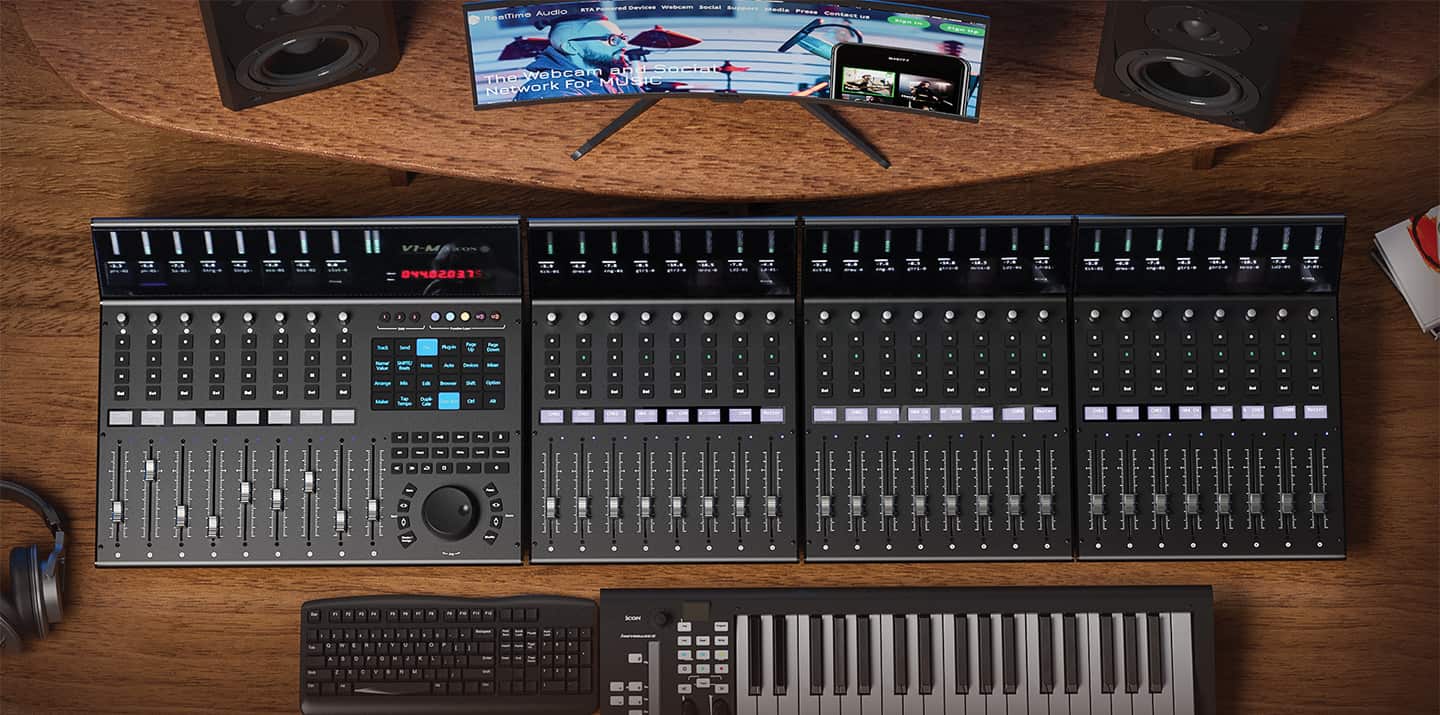
Focusing on the flagship V1-M, we’re faced with a somewhat largish ‘enterprise’ control surface. It screams professional edit suite right from the get-go. Solid plate metal that doesn’t bend or flex when you lean into it. The 485mm width and 385mm depth will require some dedicated workspace, with the rear meter bridge rising a full 180mm from the bench top. It’s big. And it grows outward, should you decide to add further eight-fader V1-X side carriages to the central unit. Up to seven additional side carriages can be added for a total of 64 channel faders (dependent upon the DAW in use) with the main V1-M unit incorporating an additional ninth master fader. Connection is via USB Type-C connection which will connect to standard USB ports with the supplied cable – invest in a solid USB hub if you’re going to run the system out to the full 64 channels. The layout is spacious, with the 100mm motorised touch-sensitive fader channels including large select, mute, solo, and record arm buttons, followed by a push-button/rotary encoder. The meter bridge incorporates a 50mm-high TFT display for each channel to reflect track names, fader levels, pan-position, channel colours and such, followed by a 12-segment LED meter. The master fader channel gets a dual left/right LED meter. To the far right of the meter bridge is a large red LED timecode display, which can reflect either bar or SMPTE readouts.
The transport section of the V1-M uses the same rubberised buttons found on the channel strips. I’m in two minds about these buttons. They all feel exactly the same. It would have been nice to feel a raised legend on each so you didn’t have to look at each one before committing to that press. But then maybe that’s just me learning the system. The top row looks after channel banking in single or x8 increments and fader flip over to sends. The second row down looks after automation modes. The third row is for transport control. I quite like the FF/RW buttons. Each press of either button moves your position at progressively faster speeds with the opposite direction button press slowing by the same gradient. All the buttons, as with the channel strip, are backlit in various colours.
NEED TO KNOW
Icon Pro Audio V1-M
Control Surface
WHEELY GOOD
Smack bang below the transport controls we see a huge slickly crafted and smooth feeling jog-wheel. Icon wax fondly of its smooth and precise jog-wheel. It is, and I quote from the manual; a “VERY high specification optical encoder”. Fair enough. It feels great and spins like a top. However, I initially found it would skip through about 300 bars in an eighth of a turn in Logic Pro. This wasn’t the case in both Reaper and Nuendo. Reaching out to the manufacturer revealed the method for adjusting the jog-wheel’s sensitivity which put things right – if only instruction for this was in the manual!
Above the transport section you’ll find 24 panels of colour-coded touchscreen buttons. These are the evolution from the legacy QCon platform’s plastic overlay system, where you’d purchase an appropriate overlay for the applicable DAW. With this newer arrangement you have 24 x 5 layers of programmable buttons. The first three of these layers look after dedicated DAW functions such as plug-in selection and editing, send selection, save, undo etc, with the final two layers being largely free to assign whichever functions your DAW supports. That’s a lot of options, and probably more than many would require. Personally, I’d find more comfort using a traditional keyboard in tandem with the V1-M, or any control surface for that matter, but the vast array of choice is there if you need it. Editing these button’s functions is via Icon’s iMap application, which while looking a little antiquated, does the job succinctly. You can additionally assign two footswitch ports on the rear of the V1-M and assign straight up MIDI control to any of the buttons.
WIDE SUPPORT
iMap is also where you can assign up to three individual DAW applications to be controlled via the V1-M. Once assigned you can flip between three DAWs in as long as it takes to boot the application. Three clearly labelled buttons entitled ‘DAW 1, 2, and 3’ flip instantaneously to whichever DAW you’re driving. It really doesn’t get much easier. I had the unit set to drive Logic Pro, Reaper, and Nuendo, which really did work seamlessly. There are, of course, differences in the button layout depending upon which features the chosen DAW supports, but for the most part standard operational features remain the same.
As for which DAWs the V1-M (and P1-M) support, the list is pretty comprehensive. All the mainstay systems such as Ableton, Logic Pro, Cubase/Nuendo, Pro Tools (in HUI mode), Harrison Mixbus, Reaper, Digital Performer, Luna, Studio One, then all the way through to some I didn’t expect, such as Cakewalk, Reason, FL Studio, Ardour, Audition, Bitwig, Samplitude, Tracktion and Ability. If you’re running something outside Icon’s supplied compatibilities, you could use the iMap application to map controls to NLE software such as Davinci Resolve and Premiere Pro and translate the controller with third party apps such as Bome MIDI Translator Pro. Your mileage will vary considerably.
SPACE CHALLENGED
For the real-estate challenged, you may find the smaller P1-M control surface more suitable. The P1-M is a mere 405 x 205mm footprint and offers the same 100mm motorised faders (albeit only eight without a dedicated master fader), eight rotary pots, 12-segment LED meters, three buttons of DAW choice and a 4×4 grid of programmable buttons with five layers for up to 80 button choices. It even sports a tiny jog-wheel – about the size of a 20c piece. Cute. Plus, if metering is what you need, an option is the D4-T display that mounts directly onto the P1-M. This provides you with the same channel displays and timecode readout as the larger V1-M – all in a meagre footprint that’ll sit nicely between your keyboard and monitor. Additional P1-X banks of eight faders can be added for up to 64 channel faders just like the V1-M/V1-X combinations.
WHY & WHERE
So, who’s a likely candidate for these style controllers? Personally, I found the V1-M somewhat immense for my work environment, and would opt for the P1-M. But I’m someone who’s primarily composing and mixing. Eight faders is ample, and the less space taken up the better. The V1-M on the other hand is a professional edit suite darling. For those mixing to vision with a DAW I think the V1-M is an attractive proposition. Large, clear metering, SMPTE readout, and that saucy jog-wheel. The faders feel encouragingly smooth compared with myriad control surfaces I’ve seen over the years (Logic/Mackie controllers weren’t really my cup of tea in the fader department). Plus the genius of switching between three DAWs at the drop of a hat is fantastic. Depending on your requirements, either surface could fill your mixing and automation needs admirably, all at a price that is somewhat astonishing for this degree of utility. Both are winners in my book.






RESPONSES