


Review: Hotone Ampero II Stomp
A surprise contender in the multi-effects market, this little box packs more than just epic guitar tones.

By Preshan John
4 March 2022
Digital audio processing has come a long, long way. Gone are the days where a guitarist can scoff at a digital multi-effects board without expecting some pushback.
Having lived most of my guitar life on both sides of the analogue/digital fence, I have checked out of the debate. I immensely enjoy the warmth and immediacy of playing through a guitar amplifier and boutique pedals. But I also appreciate the logistical simplicity and sonic consistency of a digital multi-effects pedal plugged direct into the house PA. Plus, most will agree, it’s getting harder and harder for the average punter to tell the difference.
But, of course, not every digital processor is created equal.
Usually, you can tell in the first few plucks of the strings. How does it respond to how hard you play? Does it growl when you dig in? Are treble frequencies smooth or abrasive? How clear is each note in a crunchy chord? Does it clean up like a real amp when you dial back the volume pot? Are distorted tones bold and full, or fuzzy and cheap? Are clean tones three-dimensional and rich, or dull and anaemic?
STOMPING GROUND
Putting the Hotone Ampero II Stomp through the above tests immediately had me hooked and wanting more. It’s a A$750 Chinese-made multi-effects amp/cab modeller with a raft of stompbox and effects emulations. All software is developed in-house by Hotone. Prior to this review I was unfamiliar with the Hotone (pronounced ‘Hot-tone’) brand – now I’ll be keeping an eye on them.
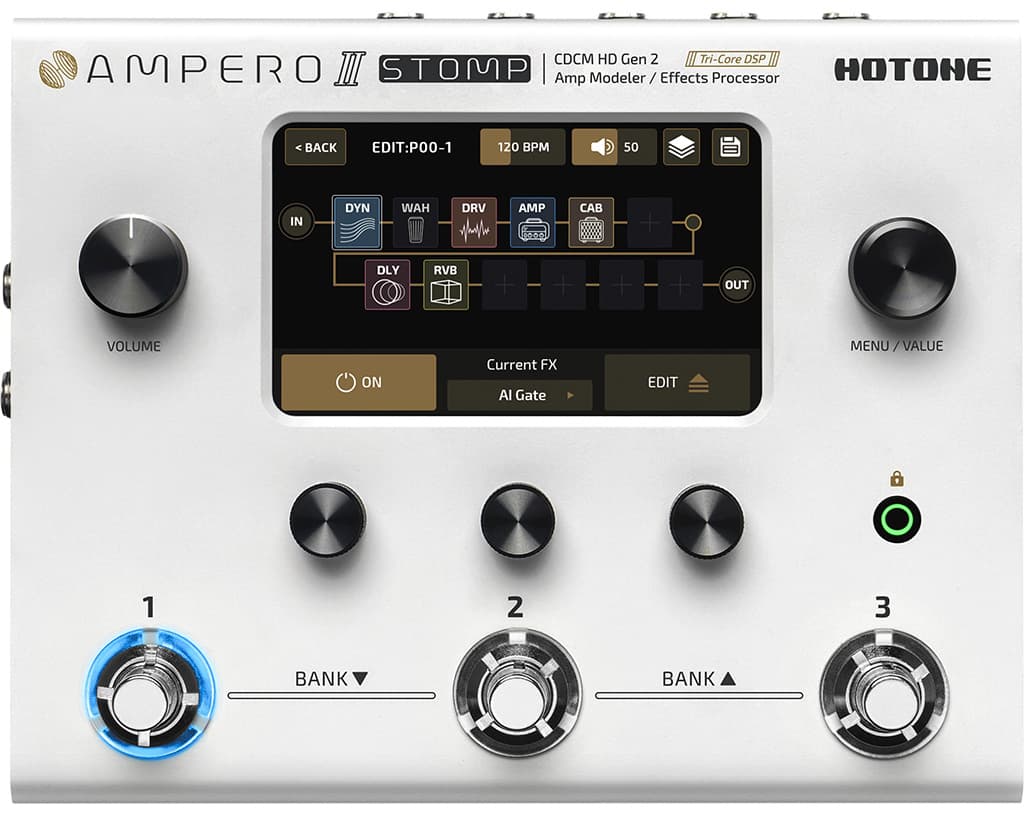
The Ampero II Stomp is barely a handspan in size but it can be used a whole lot of ways, including as a stompbox modeller in conjunction your favourite amplifier. I suggest a perusal of the site’s product page to really understand how broad its scope is. I was primarily interested in how it would perform replacing a full amplifier setup; i.e. guitar and Ampero, plus nothing.
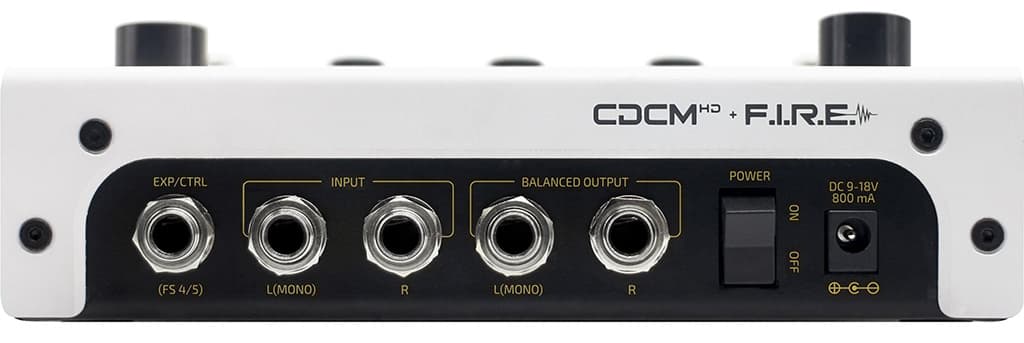
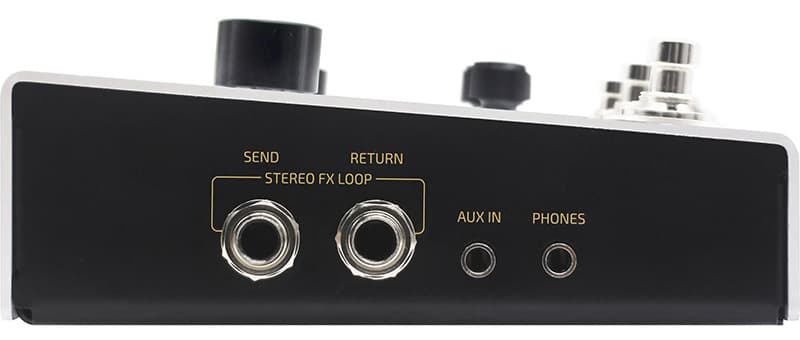
Connectivity is comprehensive. There’s a pair of inputs should you want to run something other than a guitar through it in stereo. Balanced outputs let you connect straight into a stage box at line level, or change this to instrument level and use it as part of your amp rig. Additionally there’s a full stereo effects loop, MIDI I/O, 3.5mm aux input and 3.5mm headphones output. Oh, and it can function as an 8-in/8-out USB-C audio interface too!
MAKING TONES
As far as tone is concerned, the Ampero II Stomp left me with little to be desired. With 87 x amp models, 68 x cab models and plenty of classic emulations in the lineup, it’s hard not to lose yourself in a tone journey within the first few minutes of firing it up. Over 100 stompbox emulations cover overdrive, heavy distortion, compression, acoustic simulation, modulations, wahs and more. Two discrete chains can be created instead of one if you so choose, and re-configuring the order of processors is easy with the touch ’n’ drag method.
The Ampero II Stomp makes it easy to dial in fairly complex patches via the full-colour touchscreen and quick-access knobs which adjust the on-screen parameters directly above them. I enjoyed the software application experience when the Ampero is connected to your computer. The free download quickly recognises your Ampero and opens a re-sizeable window with graphical displays for every part of your signal chain. An added bonus is a small info blurb on various processors like stompboxes and amps telling you a bit about what it’s modelling. The application is a great way to organise your patch library too.
High gain sounds abound and I was able to uncover all manner of satisfying flavours of distortions without too much effort. Clean tones seemed to require a bit more work. After I’d tweaked for a while, devising complementary combinations of amps, cabs, compressors, boosts and effects, I ended up with some glorious sounds that had all the right ingredients of an expensive sounding tone – especially when cranked up through nice monitors.
The effects sound the business. The 11 x reverb models range from short and springy to lush and expansive. If you love delays there are 27 to choose from, including emulations and the crazier ‘Infidelays’ and ‘Ambience’ options.
I missed having an expression pedal mostly for quick volume control, but you may find its absence isn’t as big a deal as you expect. Hotone sells relatively affordable expression pedals should you want one. I have no complaints around build quality. The knobs and footswitches are solid, as are the connections on the sides of the unit. The screen is sufficiently bright for most environments and I love that there’s a Lock Mode which enlarges the patch number on the screen – perfect for gigs.
NEED TO KNOW
Hotone Ampero II Stomp
Multi-Effects Guitar Pedal
LOOPY
Hotone pulled off the built-in looper quite well in the Ampero II Stomp. Enter the looper GUI by pressing and holding the centre footswitch. The left footswitch starts and stops recording and overdubs while the right footswitch stops playback. Record level and playback level can be set independently, and there’s even reverse and half speed options. Putting the looper in Post mode means you can change patch with a loop playing and it won’t affect the loop.
ON STAGE
Using the Ampero II Stomp in Patch Mode means each footswitch corresponds to a different patch. Pressing two footswitches at a time moves the patch bank up or down. The buttons are perfectly spaced apart for this to be a great way of navigating patches on stage while saving footswitch real estate.
The alternative to Patch Mode is Stomp Mode – the preferable setup for those looking to incorporate the Ampero II Stomp into their pre-existing and populated pedalboard. In this instance, the three footswitches turn individual effects in the chain on and off, or control various things like tap tempo. LED rings around each switch light different colours depending on the type of effect. You can enter Stomp Mode anytime by pressing and holding the right-most switch.
In my experience this is where the Ampero II Stomp experience is sub-optimal. Not only is there a slight glitch in audio level if you change modes while playing but it’s a few too many tap dance moves to make a basic tweak to a patch like turning on a delay or boost. As a full multi-effects solution for live guitarists, the Ampero II Stomp layout is best for players who will leave their patches mostly untouched on stage, letting the footswitches simply pick the desired patch at the time. If you’re the fast footed type and can’t get by without engaging phasers and boosts mid-solo, or setting tap tempos for each song, then the Ampero II Stomp’s real-time control may not hit the spot for you.

THE SWEET SPOT
I fall mostly into the former category where I set and forget a patch on stage, so the Ampero II Stomp was a delight. Using both humbucker and single coil guitars in a live environment, the Ampero II Stomp produced a natural and snappy feel with a sense of warmth and body and no grating nastiness in the highs.
Quick broad brush tweaks can be made easily with the Global EQ, and with six bands plus high- and low-pass filters, Hotone hasn’t skimped. It’s a truly invaluable feature. Setting patch levels is straightforward too – there’s direct control on a patch’s edit screen.
And I can’t get past the size. Many analogue stompboxes are bulkier than the Ampero II Stomp and they only make one sound. There’s something fun about carrying a full library of tones in a device that’ll just about fit in the utility pocket of your guitar case.
As this was my first journey into the Hotone brand, the Ampero II Stomp made a lasting impression on me and is a surprise contender in the multi-effects market alongside better-known brands. It deserves its place in the list of established competitors if you’re looking to go digital and own it.






I have used the Ampero II Stomp for several months now with both my guitar and pedal steel guitar and I am far more than satisfied.
To begin with, I have removed every other effects device from my signal chain: I plug my instruments into the Stomp and the output into my amp. The only other attachments are an expression pedal and a tuner, which I connect to the loop out connector. It is really that complete.
I clip my device to one of the legs on my pedal steel so that it’s always in close reach.
I am a geek, and my amp is hand made, by me. It is designed to be colorless, with nearly flat frequency response over the music range. I therefore really heavily on the Ampero II Stomp preamp and power amp modules to deliver the basic tones. There are quite a few to choose from and, to my ear, they are quite accurate.
I especially like the Princeton, Bassman, and Super-reverb models. I prefer to get my distortion from the power amp models than any of the many fuzz tones in the Amper collection, as I just like the sound of an amp breaking up. In a few of my signal chains, I include a speaker model, but those don’t appear to model speaker distortion.
There are at least three distinct ways to operate the Ampero Stomp. All of these offer essentially the same functionality, but change the user interface around. For my purposes, I play in a “patch” mode that allows me to make my real-time changes and corrections with the three knobs and three switches. These can be assigned more or less arbitrarily to control gain, patch device selection, tone parameters, tremolo/phaser/Leslie speed, and so on. This is super convenient for a steel player. I use the selector knob to select different combos and signal chains.
I have the great fortune to play with some of the best session musicians in Los Angeles. Honestly most of these guys are extremely impressed, once they see that I can get excellent sounds with a virtual pedal board the size of a thick novel, and without the mess, and reliability problems associated with the wiring harnesses that are needed in a conventional pedal board.
You can do all of the programming from the Stomp alone and it’s reasonably straightforward, but it’s much easier and more intuitive with the free available programming tool that runs on Mac and Windows. I would not, for example, want to do sophisticated MIDI setups using the device alone.
Speaking of MIDI, with a little effort, I was able to interface the Ampero II Stomp to the M-VAVE Chocolate MIDI switcher even over bluetooth. I had thought that it might be nice to add a few more foot switches and another controllers M-VAVE, but in the end it really hasn’t been necessary, and would otherwise just add more components to my kit. A second expression pedal with a foot switch, operating on the EXP 2 channel would be an easy solution, and I might go there so that I don’t have to move the expression pedals as I change between guitar and pedal steel.
I can recommend this unit without hesitation, and have done so many times.
I have only small issues:
1. In order to attach a clip to hold the Ampero II Stomp off of the floor, I had to disassemble it. Definitely not recommended for a novice or supported by the company. It would be nice if they sold an attachment of some sort to make this easier.
2. Compared to the Hotone Mini (which I abandoned) the tuner is quite good. However, for the steel guitar it’s nice to have a tuner with memory settings for the slight differences between chromatic and just tuning. Only the Peterson Strobe seems to do this. It would be nice not to have to bring that separate unit with me, if Hotone were interested in investing some effort there. As it is, I added an effects out element into my signal chains so that I have a fully buffered output to my Peterson tuner (meaning that it has no effect on tone).
3. Some sort of protective or padded bag should be part of the supplied accessories. There are lots of sharp edges around in my rig that could damage the Ampero II Stomp surface. I made my own little sack.