






Review: Audient iD48
It’s taken over 10 years for Audient to deliver 'its ultimate' iD interface. There are no major surprises, just more of what we love about Audient only incrementally (and audibly) better.

10 September 2025
It’s almost 11 years to the day since I reviewed the first Audient iD USB audio interface – the iD22. Coincidentally, the review included Audient’s ASP880; a 1RU digital interface converting eight channels of Audient’s full-spec console preamp (with balanced inserts) to ADAT and AES. Back to the present and the two have now merged, responding to customer demands to finally deliver an eight preamp version of the popular iD line. In Audient’s words, this is ‘the ultimate iD interface’ but it’s perhaps better understood as the latest step in an iterative design process that has always placed the integrity of signal path above all else.
UNBOXING
The first rackmount iD, the iD48 surprisingly came out of the box sans ears and rubber footed. While I imagine most will install in a rack or roadcase, this configuration was extremely useful in my test contexts. At 327mm deep, and requiring closer to 450mm clearance once all cabling is connected, desktop use is most easily accommodated on deeper surfaces or well away from a wall. Rack ear installation gave me an excuse to take a look inside and I was pleased to find not only that this process was a breeze but that Audient has neatly divided its circuits between several boards; clearly isolating the analogue input circuitry, input connectors, digital conversion/interface and controls, and power supply. A three-year warranty certainly provides some confidence but the knowledge that a small fault will not trigger the replacement of the guts of an entire device is pleasing… and sustainable.
The design brief for the iD48 may well have been one word, ‘stealth’. There’s no power light and the on/off switch is definitely hiding in plain sight – the aluminium Monitor control serving double duty (press once for on, press and hold for three seconds to shutdown). As some compensation, the Main meters animate at a regular interval of a few minutes. At best I found this distracting and would welcome a setting option to disable the LED twitch. Offering up to 24 software I/O at 44.1/48k (reduced to 16 at 88.1/96k) the USB-C (USB2.0) interface is served by a range of I/O configurations matched by few in this sector of the market. Eight rear panel Amphenol combi connectors provide microphone (XLR) and line (TRS, via 10dB pad) inputs to the first eight channels, with front panel TS jack inputs feeding two discrete Class-A JFET instrument inputs (Channels 1 & 2 only). Balanced inserts are included for all eight analogue channels via DB25 (Tascam format), and serve additional roles as direct ADC inputs, preamp and/or DAC outputs; all assignable per track. Two optical I/O ports, both supporting either ADAT or S/PDIF, provide channel expansion or allow the iD48 to be added to another system as a preamp and converter expander. While optical sync to and from other devices is supported, BNC wordclock I/O (with switchable 75 Ohm termination) is also provided.
The rear panel is rounded out by two pairs of impedance-balanced TRS monitor outputs, USB-C connector and mains power IEC. When used as a desktop interface I found the positioning of the USB port, towards the lower edge of the case, to be slightly precarious and care should be taken to keep the area behind your interface clear. Analogue Outputs 5-8 are supplied via two front panel high-current headphone amplifiers with their own hardware level controls. These two stereo outputs boast 124dB dynamic range and support headphones up to 600 Ohms. By comparison, the rear outputs exploit advanced 32-bit ESS converter technology to achieve 126.5dB dynamic range with the ADC quoted at 120dB.

NEED TO KNOW
Audient iD48
USB-C Audio Interface
CONSOLE DEEP
In general, I’m drawn to focus upon the utility and flexibility of the audio interfaces I review. If you like to move between studio, stage, theatre and location environments, such factors are important. Notwithstanding, it’s important to acknowledge that not all devices are designed with this in mind. Like the concurrently launched SSL18, the iD48 wears its console heritage on its sleeve. It’s clearly been designed to serve as the centrepiece of smaller studios and production suites, with a complementary set of functions. At the heart of this is the Audient console mic preamp – originally designed by David Dearden in 1997 and currently employed in the ASP8024-HE console. If you’re interested in circuit design I’d recommend returning to AT’s review of the ASP880, from 2014, where Audient provided deeper insight into an iterative design process that continues to adapt to the challenges and requirements of every new implementation. Its website extends upon this discussion, including comparisons between the performance of the iD preamps and its consoles.
The ultra low noise, low distortion preamps utilise an all-discrete Class-A design (Input impedance >2.8kΩ), featuring carefully refined input transistors and a high-grade op-amp, to deliver 68dB of gain while prioritising clarity and RF immunity. Each channel features an analogue gain control, hardware switchable 48V (±4V, 10mA) phantom power (only available to XLR connections) and software switchable -10dB pad and high-pass filter (100Hz cutoff frequency). An additional 10dB digital boost and polarity invert switch is present on all analogue and digital input channels.
It may be the latest in a line of great-sounding interfaces but, as a fan, I hope it’s not the ultimate
A brief sidebar here: all eight analogue input channels may be configured individually in one of three input modes, switched via software and indicated via the front panel illuminated ADC indicator. In Mic mode, the ADC is fed directly from the preamp outputs, freeing the Line Output/Insert Send DB25 port for output duties. ADC Direct mode deactivates the Mic/Line combis routing the Insert Return/ADC Input DB25 into the converter. This may be used as a pristine input signal path or in combination with the Send DB25 to utilise hardware effects from within a DAW. Finally, the Mic Insert path option turns the DB25 ports into a balanced insert point, post the iD48’s preamp and prior to the ADC input. When describing the design process for the ASP880, Audient noted the difficulty of packaging eight channels of its console preamp within a single rack enclosure. In the case of the iD48, this process has resulted in the omission of most of the per-channel hardware controls. Entirely understandable, and consistent with other like products, it certainly helps to maintain the appeal of the more spacious iD44 for those with lesser channel requirements.


LISTEN UP
I took the opportunity to repeat many of the preamp comparisons from my 2014 Audient review, along with some new voice-over and live performance applications, and in practice all of the technical detail amounts to a preamp with performance comparable to single-channel standalone units each closer to the total price of this interface (Phoenix Audio DRS1, Universal Audio 108). I repeated the tests for the iD DI, continuing with the UA and adding the Radial JDV Mk3 (via the Phoenix) into the equation. Once again variations ranged from imperceptible, or irrelevant, to a viable character choice. In these cases the variable impedance settings allowed by the Radial DI perhaps resulted in the greatest divergence. As Audient itself has pointed out, the preamps are not intended to be neutral and this was perhaps best illustrated when comparing a multitrack recording split between the iD48 Mic/Line channels and the DB25 ADC Direct inputs. With gain set at its minimum, the audio, recorded via the preamp channels, was approximately 0.5dB louder. Once levels were matched, a 10 track demo was compared blind, with a helpful third-party handling switching duties. The differences are apparent but not so stark that you’ll feel compelled to avoid the mic channels when using alternative outboard preamps. Indeed, the gently softened high end and equivalently thickened lower midrange produced a result that was generally preferred.
BEATING STUDIO HEART
I’ve long been a fan of the smaller Audient interfaces, so it came as no surprise that the iD48’s preamps and conversion sounded brilliant. Equally, the round-trip latency and low-latency audio stability under load remains comparable with other interfaces in its class; if slightly short of the best results I’ve documented. What the iD48 offers, however, is Audient performance on a scale that you can build a small professional studio around. This power and flexibility is accessed predominantly via the iD Software Mixer Application and a System Panel. For existing iD users this is all likely to be very familiar and comfortable territory.
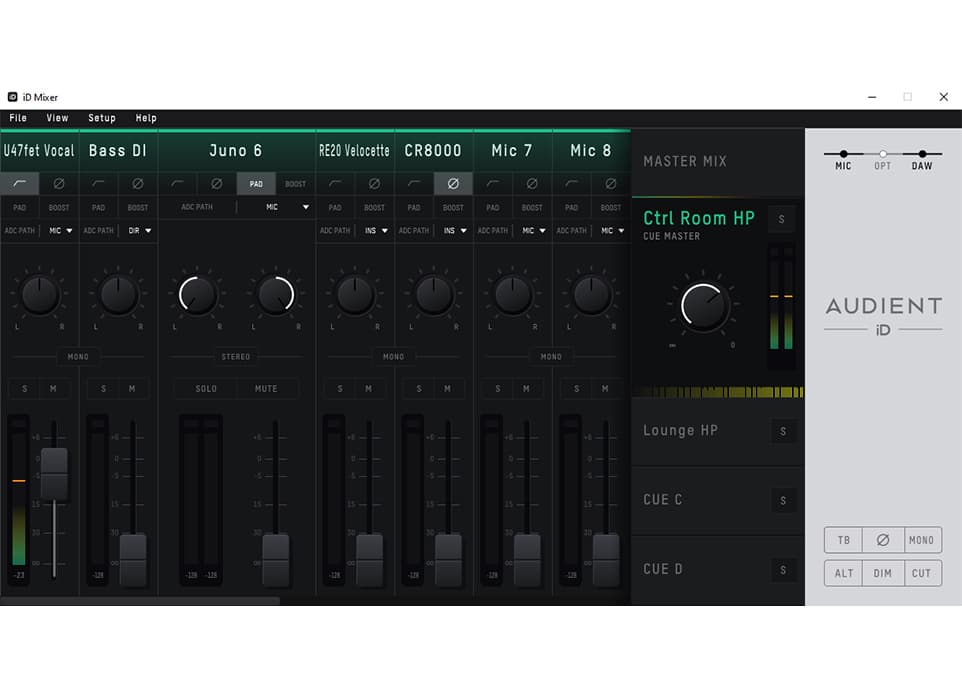

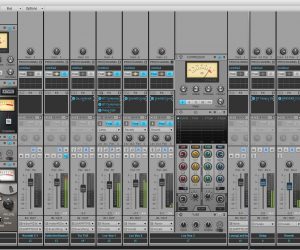
The iD Mixer is a five stereo bus Monitor mixer with input channel controls and a master section with a range of switchable controls. All channels and buses can be renamed, and available inputs and software returns may be mono or grouped in stereo pairs, though this does little to preserve screen real estate (while channels can be viewed or hidden in groups (Mic, Optical, DAW) the channel strips themselves are chunky and not scale-able). Input channels feature detailed metering, including numerical readouts, and the full complement of aforementioned switchable functions (HPF, Pad, Polarity et al). The remainder of controls (Fader level – without numerical value, Pan, Solo, Mute) are enabled only for the creation of monitor and submix groups. The Main Mix is, as you might imagine, intended to be your primary output channel. As such, its signal is reflected on the unit’s only front panel LED bar meters and its output level is controlled via the large aluminium master volume control. Notably, this mix can be assigned to any combination of hardware outputs so your hands on control need not be tied to hardware Monitor Output 1-2.
Once you’ve clicked on the Mix selector, you then use the channel faders and controls to produce an extremely low latency monitor mix, combining input channel monitoring and software playback. It’s worth noting that the loopback latency figures I recorded for the iD Mixer were as good as I’ve seen. The four auxiliary Cue Mixes (A-D) operate in much the same way, though they include an additional output trim control and a Solo button facilitating Cue previewing via the Main bus. All mixes have an output level bar meter and a unique Chronometer, providing about 18 seconds of peak history. This is extremely useful if you’ve had to look away from your screen. All mixes can be renamed. Annoyingly, for me at least, the software playback channels made available for monitor mixing have been limited to the first five stereo pairs (10 channels out of a possible 24). As acknowledged earlier, many traditional studio applications will be unimpaired by such a choice, nevertheless I’ve valued the ability to exploit such freedoms via other interfaces.
TREATS & QUIBBLES
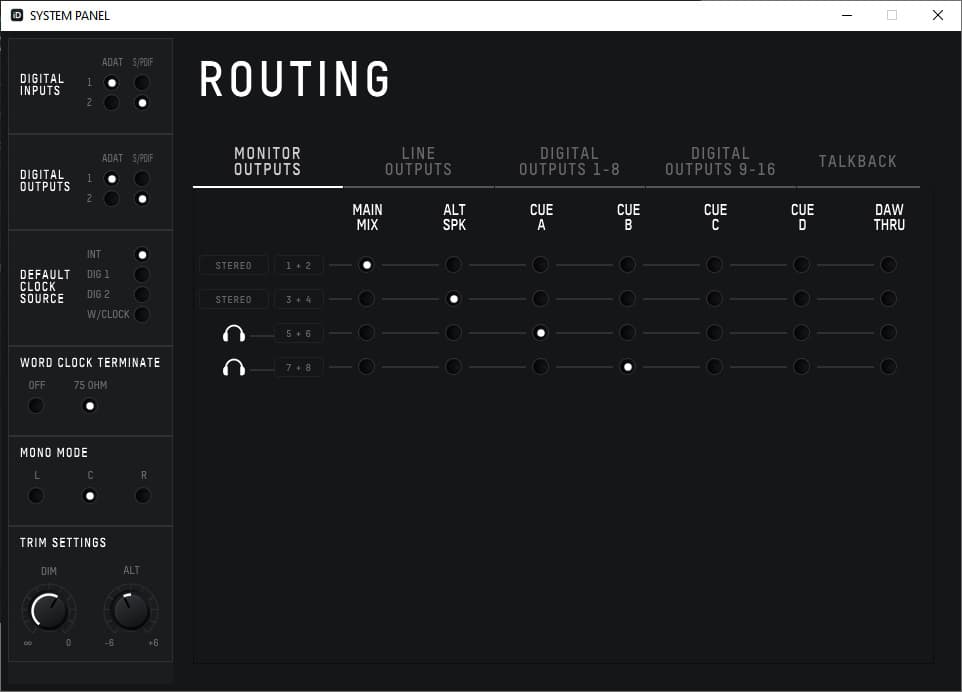
Last but by no means least is a host of Monitor section utility functions, settings and routing options. The front panel of the iD48 features four illuminated function buttons, two fixed and two assignable. Again by comparison, the more roomy iD44 is blessed with seven. ALT allows for the switching of a second assignable alternative monitor output pair to be fed via the Master Mix, while TB activates a Talkback function for the four Cue mixes. The Talkback input can be assigned from any of the hardware inputs or even an external source, like your laptop’s onboard microphone. The Talkback input channel only meters when active, so adjustment mid-session will be audible. The two configurable F-Keys (F1 & F2) can be assigned to control two of: Mono (sums stereo output), Phase Flip (Flips the phase of one side of the stereo field and engages Mono to remove centred elements and reveal panned elements), Dim (reduces master output by a preset amount), and Cut (Mute Main Mix). The finer details of these functions are controlled from within the System Panel; Dim and Alt trim levels the most obvious, and Mono mode (Left, Right, or both speakers) is a worthwhile inclusion. Optical mode assignment (ADAT or S/PDIF), Clock Source and Word Clock termination are also found here. Talkback source assignment is handled via a tab in the routing matrix, while a stereo Loopback source can be assigned from within the Input Routing option, amongst the iD Mixer’s menus. This loopback source is then available for recording on software input channels 23-24. Within these menus you’ll also find the option to Save and Load complete Mixer configurations and to store a single configuration as a Standalone State.
The remainder of the routing matrix is dedicated to the assignment of software sources (Main Mix, Alt Speaker, Cue A-D, and DAW outputs) to hardware output pairs. Monitor mixers can be sent to multiple outputs but it is not possible to combine different mixes on a single output. The DAW Thru option bypasses the iD Mixer entirely for those channels and, for the most part, DAW outputs remain tied to their related hardware pair but for one exception: Line Outputs (9-16), relating to the Line Output/Insert Send DB25 port, can be fed either by software outputs 1-8 (DAW Analogue) or 9-16 (DAW ADAT). It would be a shame if the choice of a USB2.0 implementation has robbed users of a valuable additional eight output channels, at both lower and higher sample rates.
The iD48 delivers more of the Audient console sound in an only slightly larger rackmountable package. It may be the latest in a line of great-sounding interfaces but, as a fan, I hope it’s not ‘the ultimate’ and we see a continued evolution of the iD family.
- 24 Inputs
- 32 Outputs (24 Simultaneous Outputs over USB)
- 8x Class-A Audient Console Mic Preamps
- 2x Discrete JFET Instrument Inputs
- Main and Alt Speaker Outputs
- 2x Independent Headphone Outputs
- 2x ADAT Input & Outputs
- 8x Switchable Balanced Inserts
- Ultra-low Latency Software Mixer
- Audio Loop-back
- ScrollControl
- Dedicated Alt Speakers and Talkback Controls
- 2x User Defined Function Keys
- +48V, Pad, +10dB Boost, Polarity Invert and HPF Controls
- Word Clock Input & Output
- Standalone Mode
- Power On/Off
- USB 2.0 Compliant (24in / 24out)
- 24-bit/96k
- Detachable Rack Ears
- All-Metal Design
- Free Software & Plugins






can you control the internal mixer with a midi controller?
is the internal mixer automatable with CC controls from external hardware?