






Review: Arturia Keylab Essential
We take the ‘essentials’ version of Arturia’s Keylab on the road to see if it can handle the pressure.

By Preshan John
10 November 2017
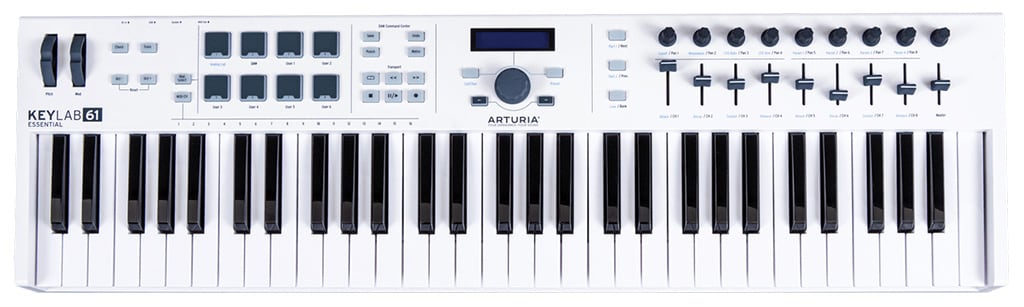
Don’t get me wrong, I dig Arturia’s stuff. However, with so many MIDI controllers already in its catalogue, I often wonder if this exercise in minute differentiation is necessary. When the new KeyLab Essential 61 keyboard controller showed up, I really wasn’t sure why I’d need an ‘essential’ version of the existing Keylab 61. Turns out Arturia has managed to give me exactly what I need, for less.
Arturia’s V Collection 5 would have to be my favourite software synth package, because you can pull up just about any classic keyboard sound — from a Minimoog bass to a flanged Rhodes tone — with minimal hassle. Amongst all the razzle-dazzle is Analog Lab 2 — Arturia’s live performance-optimised application that acts as a central hub for all V Collection sounds. Here’s where the plot thickens — KeyLab Essential’s strength (besides being a perfectly capable universal MIDI controller) is super tight integration with Analog Lab 2.
I had a keys gig coming up requiring multiple patch and scene changes. A perfect opportunity to test how effective this KeyLab Essential/Analog Lab 2 marriage really is. The pairing should, in theory, cover all bases from prepping patches to playing them live.
PLAN AHEAD
Time for pre-production. I was tasked with providing all the lead lines for the songs in our four sets. Each song has distinct synth sounds and I wanted to match them as best I could with my Analog Lab/KeyLab combo.
I chucked on some headphones and started messing with Analog Lab 2’s 5000+ presets. Thankfully there are four levels of categorisation — Type, Banks, Characteristics, and Instruments — to drill down to a relevant sound via a process of elimination. First off the bat was a short, sharp and bright lead tone to carry the first verse. I went for Lead and Percussive, with Bright and Short characteristics and soon found one that fit the bill. Because I have the full V Collection installed, I could tweak the Prophet emulation further. After a few adjustments the patch was perfected.
Curating your own preset palette is easy, too. Saved patches show up in the User Bank, just create a playlist and drag them in until all your juicy tones are lined up in order, ready for a gig. I found the whole process thoroughly enjoyable.
One of KeyLab Essential’s hidden powers is the ability to remap the MIDI controls (pads included) eight different ways — one for Analog Lab, one for DAW control, and six User configurations. Since I wasn’t using the pads to play samples or drum sounds, I wanted to repurpose them as patch selector buttons.
Diving into Arturia’s MIDI Control Center lets you deeply configure KeyLab Essential’s MIDI communication. I’m least fond of this painstaking, left brain aspect of computer music, but after a little trial and error I had each pad assigned to patches 1-8 in the Playlist and saved it to the User 1 MIDI map. The result conveniently allowed mouse-less patch changes on stage.
NEED TO KNOW
Arturia Keylab Essential
Keyboard Controller
SHOW TIME
With my confidence boosted by the refreshed tone library, I walked into the first rehearsal armed with the KeyLab Essential 49 and a MacBook Pro.
A few rules of thumb when entrusting a computer with musical instrument duties on stage. Firstly, keep just the instrument application open. You want all your CPU juice concentrated on one task. Secondly, go into your energy saver settings and set your sleep timer to Never. Third, use gaffer tape to secure all cable connections to and from your laptop. Now’s not the time for a clumsy footfall to curb your show. Fourth, try to get the best signal out of your laptop possible — don’t use the headphones output if you can help it. I hooked up a Focusrite Forte to handle D-to-A conversion, with the stereo outputs DI’d into the PA. Finally, choose a buffer size that responds fast but doesn’t excessively tax your processor resulting in snaps, crackles and pops. 64 samples was just right on my machine and interface combination.
Using the KeyLab Essential at the gig went as well as I could’ve hoped. The Analog Lab 2/KeyLab Essential duo formed a truly coherent experience that wasn’t dissimilar from playing a regular hardware keyboard. I developed a new appreciation for the pre-production effort that goes into preparing sounds for the stage while sitting in a home studio. I saw Arturia’s MIDI controllers in a whole new light given the live possibilities.

LIGHTEN THE LOAD
Sure, MIDI controllers have their place in a studio during the songwriting or production workflow. But in a world where an artist’s signature sounds are more often built in laptops than on 50kg modular analogue synths, there’s a need for products that lend a physical embodiment to their software instruments counterparts. Arturia’s KeyLab Essential does it easily and affordably, without you breaking a sweat to pick it up.






RESPONSES