


Review: Zoom M2 MicTrak
The M2 joins the M4 as a go-anywhere mic/recorder. What’s it got and who’s it for?

18 July 2015
Review: Stephan Schutze
I would never buy the Zoom M2. This might seem like a strange way to start a review, but the opening point I’d like to make is around finding the right solution for your particular needs.
Just because the M2 isn’t the product for me, obviously doesn’t meant it’s not the perfect device for you.
Some of what I’m observing is Zoom’s ongoing segmentation of the market. With the M4 and now the M2 the segmentation gets narrower and narrower. So there are some choices to make.
As a pro sound recordist, I am not the intended user for either the M2 or M4, I am however the intended user for a device like the Zoom F6 location recorder, and that is why I purchased two of them shortly after it was released. In other words, if you create a product that closely matches the needs of enough users, you’ve got yourself a winner.
So while a review of any device should comment on the value for money and the effectiveness of the technology, it is also important to reflect on who the device is designed for. In the case of the M2 I want to compare it to the Zoom M4 mainly because I reviewed that unit recently, but I also want to explore what exactly these two units can achieve and how they might improve the workflow for various purposes.

SIBLING RIVALRY
First off, what is the Zoom M2’s purpose, and how does it compare to its sibling the M4? Both units are handheld portable digital recorders, but I think its physical attributes gives us a good insight into Zoom’s thinking. Many Zoom recorders are square-ish functional units, while the M2 and M4 are both referred to as MicTrak devices, which is not a bad portmanteau descriptor. They are modelled to resemble a traditional vocal microphone — the archetypal ‘ice cream cone’ shape that most folk will instantly recognise. This allows the MicTrak series to be slotted into a mic-clip on a stand, carried in-hand for interviews and generally regarded as a microphone with a built-in recording function. While this might be splitting hairs it is actually functionally different to a recording device with a built-in mic.
The form factor plays a large role in how people will respond to and work with devices like the M2 and M4. I can tell you from years of experience that when you ask someone a question and then push a device into their face that looks more like a taser than a mic, the reactions can be quite varied. I often have to stop and explain what it is and what I am doing. If my job was to regularly gather vox pop content on the streets, a MicTrak unit that looks like a microphone will legitimately make that job easier. Equally, if I run a studio and suddenly need an additional channel for another instrument and all my inputs are occupied on a multitrack device, the MicTrak is a simple, easy, and, importantly, quick solution. Pop it in a mic stand and hit Record. It is not that hard to sync audio in DAWs these days, and the above solution is much faster than messing around with mixers and additional cables etc. If you are really worried about sync, use a clapper board.
NEED TO KNOW
Zoom M2 MicTrak
Handheld microphone & recorder
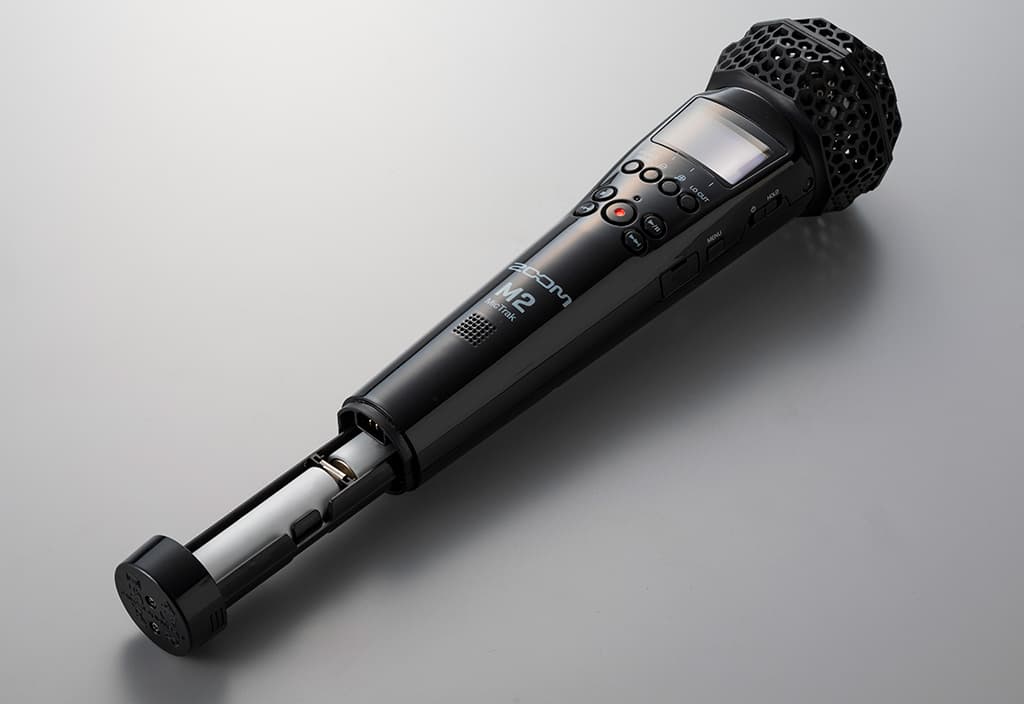
push a device into their face that looks more like a taser than a mic, the reactions can be quite varied
SOME OF DIFFERENCES
The obvious difference between the M2 and the M4 is the number of channels. For the purposes I mentioned above, the M2 would be perfectly suitable and, if cost is a consideration, then the M2 is a thriftier choice than the M4. The M2 lacks the XLR inputs and timecode of the M4, so those are the key areas you would need to consider when making a final purchasing choice, but considering the M2 looks to be less than half the price of the M4, it is certainly a strong alternative to its sibling.
Like the M4, the M2 has a form factor specifically designed and constructed to minimise handling noise. Initially, I suspected the M4’s handling noise could have been better, until I took the time to compare it to all my other handhelds, and it actually holds up really well. The M2’s design ensures similar performance. Both units utilise a thin mesh membrane cover to protect against wind. The membrane may not hold up to a hurricane, but I was overall very pleased with how effective the screen is against general wind noise. Wind noise is probably the single most common enemy of clean audio, so Zoom’s efforts in research and design on these screens is very much appreciated.
The M2 has a smaller display screen than the M4 but Zoom has come a long way in how it presents information — it’s intuitive and easy to access. Personally, I’m a fan of a colour display, even still I use black and white screens on many of my units and in general they are perfectly adequate.
ME TOO?
The M2 has a strong feature set. Have a look at the box item for the full list. I’ve talked about many of those features in greater detail in my Zoom M4 review, which you can find here.
But the final question remains: would I recommend the M2? That depends entirely on what you need to use it for and what your budget is. For general vocal recording, or a simple setup for recording instruments, the M2 will hold up really well. It’s certainly a sturdy unit that can handle itself in both a studio setup and out in the field, and it is an inexpensive, functional, and simple to operate device. Zoom’s preamps have proven themselves to be of a high quality and reliable for the money you spend. If all the above fits your needs then the M2 is a good match; if you feel its close but not quite there, then the M4 might be a better fit. It’s nice to have the choice.







RESPONSES