




AI, DAWs & Audio 2
In the second instalment of this series Greg Simmons delves into AI training, provides guidelines for an AI-assisted DAW intended for mix engineers, and suggests using EEG to provide human sensory feedback to the AI.

By Greg Simmons
2 April 2026
In the closing paragraph of the previous instalment I wrote that AI developers should be shifting their focus away from tools that nobody asked for and towards the needs of potential users by asking what is needed, what is wanted, and what is worth paying for. It was followed by two examples of AI-based offerings that I’m not interested in: 1) becoming the most dangerous person in the room, and 2) having an AI girlfriend trapped in my phone. I want artificial intelligence, not adolescent stupidity.
UNDERSTANDING THE WORK
I’m very interested in AI tools that are made in consultation with people who understand the work and that thereby focus on what is truly useful and matters. There’s more to editing than cutting and joining – unless you want a glitch. There’s more to making a sound punchy than pumping up the bass and heavily compressing it – unless you want something that is always either too strong or too weak in the mix, but never just right. There’s more to making a sound bigger than turning up the reverb – unless you want it submerged in spatial mud when heard in the mix.
When you understand the work you also understand its artefacts and rough edges. You know what to listen for. You do what’s necessary to reduce the artefacts, and you do what’s necessary to smooth out the rough edges. If AI is going to be of any real use to audio professionals it needs to anticipate and identify those artefacts and rough edges, fix them if it can, or highlight them for an audio professional to fix. If an AI-assisted DAW can make 200 edits on a drum track or a dialogue recording in less than a minute, I won’t mind fixing the handful of edits it can’t – as long as it can direct me to them. In other words, it knows they’re not right but cannot fix them itself…
AI developers should be teaming up with DAW and NLE developers, and asking audio and video pros what AI tools would actually help in the production process. They should be spending time with those pros to gain as much understanding of the work as necessary: training the AI, testing it, providing feedback to improve its effectiveness, and repeating the process until the AI reaches an acceptable level of ‘understanding the work’ to make it helpful. Then they’d have a tool that is truly useful and worth paying for.
Author Jeff Gothelf coined the term ‘understanding the work’ in relation to AI training, and sums it up nicely here. It’s a brief but worthwhile read that leads nicely in to…
UNDERSTANDING THE TRAINING
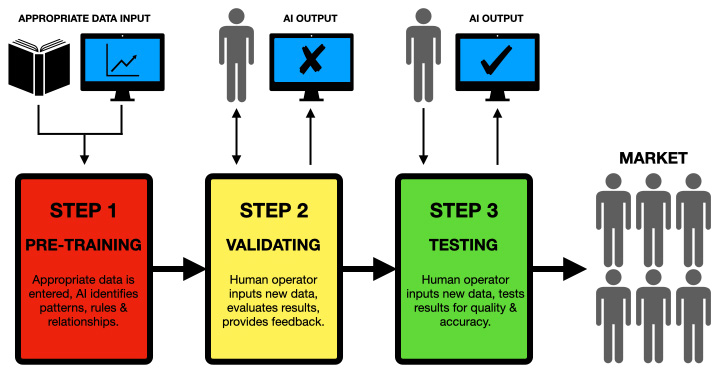
In the context of AIs the training process refers to teaching an artificial intelligence system to perform specific tasks. The first step is pre-training, in which the AI is exposed to large amounts of appropriate data from which it learns to identify patterns, relationships, and rules. The second step is known as validating, where human operators provide the AI with data it has not previously been exposed to, evaluate how it responds, and provide relevant feedback. The third step is known as testing, where the AI is exposed to more data it has not previously been exposed to, and the results tested for their quality and accuracy. As with any testing in a learning environment, low accuracy results indicate going back to step two or even step one, while consistently high accuracy results (e.g. approaching 100% every time) are encouraging but may indicate a fault in the testing process. Through iterations of these steps the AI’s results are ultimately refined to provide the desired level of performance.
I want artificial intelligence, not adolescent stupidity.
For perspective, let’s look at ChatGPT and its training process…
‘ChatGPT’ stands for ‘Chat Generative Pre-trained Transformer.’ ‘Chat’ refers to its primary function of engaging in conversational interactions; it is fundamentally a chatbot. ‘Generative’ refers to its ability to generate an output (in this case text responses) based on the input it receives. ‘Pre-trained’ means it has been trained on a vast set of relevant data prior to being fine-tuned for a specific task, enabling it to understand and produce human-like text. ‘Transformer’ refers to the underlying architecture used to process and generate language; the Transformer model is a popular framework in natural language processing. More than meets the eye, huh?
The term ‘ChatGPT’ therefore describes an AI model that’s designed to generate conversational text based on prior training and advanced language processing capabilities.
ChatGPT-3.5 was the first version to go public, in November 2022. It was trained using a Machine Learning technique called ‘supervised learning’, followed by ‘reinforcement learning’. It was pre-trained from vast datasets containing text from books, websites, and other publicly available sources – but its training was limited to information that existed up to September 2021, a date known as its ‘knowledge cut-off’. Initially, human trainers provided example conversations to guide its responses. Then, reinforcement learning with human feedback (RLHF) fine-tuned its performance, where human evaluators ranked its output and provided feedback to improve quality. This iterative process enabled ChatGPT-3.5 to generate coherent, contextually-relevant responses across diverse topics.
On March 5 2026 OpenAI released the latest versions of the ChatGPT ‘family’: ChatGPT-5.4 Thinking, ChatGPT-5.4 Pro and ChatGPT-5.4 Mini. These versions all have a knowledge cut-off of August 31 2025. To reduce hallucinations when formulating responses based on information beyond their knowledge cut-off [as discussed in the first instalment of this series], The ChatGPT-5.4 family relies on advanced web browsing techniques and native computer interaction (i.e. mimicking human behaviour when searching and checking information), allowing it to search the internet, read screenshot-based data (i.e. extract text from images), and interact with other software to fetch real-time information. Nonetheless, any results based on information beyond its knowledge cut-off should still be treated with caution because, just like when a human is searching for information, it’s possible to come up with two related data points with missing or conflicting information between them, and assume – or hallucinate – the most plausible connection.
[Scroll down to ‘Educating Leta’ for a real-world insight into AI testing and training.]
AI-ASSISTED DAWS FOR MIX ENGINEERS
Because this magazine is called AudioTechnology we’ll now move away from chatbots, data searches and hallucinations, and focus on an AI intended to exist within a DAW and assist with audio production duties. Many of the processes discussed below have equivalents for those working in video production, and those equivalents would apply to an AI-assisted NLE.
An AI designed to assist a DAW would be fundamentally different to ChatGPT because it’s not a chatbot, and doesn’t need to be. If implemented correctly it would have no need to chat with the user. Most of its functions would be integrated into the DAW as additional menu items, in the same way that Apple Intelligence’s features appear within Apple’s apps – no fuss, no special UI, and no nerdy ‘entering AI mode’ nonsense. Nobody wants to jump in and out their workflow to use AI features; accessing them should be as simple as selecting a menu item, or double-clicking a plug-in to see its parameters. They should be part of the workflow. The AI is contextually ‘prompted’ via the mix engineer’s current choice of settings and the recent mix history (i.e. the order the changes were made in, and the resulting differences they created) – which collectively tell the AI what the mix engineer wants to to achieve. For example, increasing the separation between two channels should be as simple as selecting the channels, choosing ‘Separation’ from a pull-down menu, and letting the AI increase the separation between the selected sounds using the engineer’s current settings and plug-ins as a starting point. There’s no point in using reverb to solve the problem if the mix engineer is creating a relatively dry mix and is relying on EQ to solve the problem. When the AI is finished, a ‘more/less’ slider allows the engineer t0 fine tune the result, and a Retry button tells the AI to try a different solution.
Something Like This…
The following is a map for creating and training an AI-assisted DAW that would be undeniably useful to mix engineers. It assumes the AI was pre-trained with the objective fundamentals of music, acoustics, psychoacoustics, audio signal properties, a familiarity with the typical parameters found on mixing console and effects, the mixing process, the mix aesthetics of different music genres, and an awareness of the above-mentioned ‘understanding the work’ issues.
This pre-training would then be validated by giving the AI common mixing-related tasks such as creating a new session and populating it with audio files from a given folder, creating specific signal processing paths, and responding to typical mix challenges such as the following:
a) using the channel’s existing settings as a reference, increase the level of musically valid frequencies and reduce the level of musically invalid frequencies while retaining the signal’s perceived brightness;
b) using each channels’ existing settings as a reference, increase the clarity between the selected sounds by reducing any frequency masking between them;
c) using the DAW’s standard plug-ins, reduce a signal’s musical dynamic range from 20dB to 12dB in the most unobtrusive way possible;
d) using each channel’s compression plug-in as a reference, match the musical dynamic range of the selected signals within ±3dB;
e) remove all ‘ums’ and ‘errs’ from the selected dialogue track and indicate any changes that may be problematic;
f) de-ess the selected vocal track and indicate any changes that may be problematic;
g) edit the selected drum track to remove all spill, and indicate any edits that do not allow a smooth transition.
The results of these challenges are then assessed by ‘on the payroll’ mix engineers to provide feedback for improvement. [Solutions to challenges (a) to (d) are discussed in the fourth and fifth instalments of my Mixing With Headphones series.]
Nobody wants to jump in and out their workflow to use AI features
The AI then receives reinforcement learning with human feedback by further work with ‘on the payroll’ and/or contracted mix engineers using sessions specifically created to present the types of challenges a working professional would prefer an AI to do.
The processes above are repeated until the AI-assisted DAW is consistently delivering acceptable results – where ‘acceptable’ means all of its suggestions remain within the confines of its pre-training and therefore are not ridiculous (although they may not always be helpful), and considering its fundamental role is to assist mix engineers but not replace them. During this process there will always be an experienced mix engineer’s finger poised over the Acceptable, Retry and Ignore buttons.
Finally, when the AI-assisted DAW is consistently delivering acceptable results the developer lets it out-of-the box and onto the market, where it begins its individualised self-training in-the-box of the mix engineer who owns it – learning their preferences, techniques and aesthetics, and becoming increasingly personalised and useful. It’s a tireless assistant engineer with an infinite attention span – learning and working unobtrusively from the other side of the screen rather than looking over the mix engineer’s shoulder or regularly disengaging to check its socials. It will never be late for work, it will never take a sick day, and it will never need to leave early for a family commitment.
LIFE AI IMITATES ART
As part of its learning process, the AI cross-references the mix engineer’s changes against its pre-trained and validated knowledge (as described earlier) in search of plausible objective justifications – for example, the mix engineer altered a delay most likely to fit into a musically-valid time, nudged an EQ choice one way or another most likely to reduce masking, or used peak limiting most likely to raise a signal’s overall level without clipping. The AI is not looking for specific numerical values to mimic in a paint-by-numbers manner. Rather, it’s attempting to identify the circumstances and reasons behind each change so it knows when to suggest or apply similar changes if requested.
If the AI cannot find a plausible objective justification it can, during down time, ask the mix engineer why that change was made – opening the relevant session and highlighting the change. If, with the help of the mix engineer, it can determine an objective justification that could be applied to similar situations, it could then test the limits of that change by increasing and decreasing the relevant settings to determine a ‘window of acceptability’ based on ‘too much’ and ‘not enough’ responses from the mix engineer.
Any changes the AI cannot find an objective justification for are considered to be subjective decisions. Rather than treating them as solutions to specific circumstances, they become part of an ‘aesthetic profile’ the AI creates of the mix engineer – some mix brighter than others, some use more compression than others, and some use less reverb than others. If given a task such as creating more separation between two sounds, the AI could come up with a number of working solutions but will present the one that most closely aligns with the mix engineer’s aesthetic profile. The other solutions will be queued accordingly, ready to present if the mix engineer does not like the first offering. Through the use of the aesthetic profile, the AI is essentially making subjective/creative decisions based on the mix engineer’s aesthetic.
To accelerate the learning process the AI-assisted DAW can be granted access to past session files to build a history from which it can identify recurring patterns in the mix engineer’s process, such as “this engineer always reduces 400Hz in kick drums until it represents about 10% of the drum’s total energy spectrum” or “this engineer never makes any EQ cuts to guitar sounds, only boosts”. It’s no different to an assistant engineer asking “Why did you do that?”, and the mix engineer shrugging while answering, “That’s just the way I like it to sound…”
All of these things define a mix engineer’s approach and overall aesthetic. An AI-assisted DAW could have numerous users, and will, over time, create aesthetic profiles for each of them – assuming there is a sign-in or log-in process so it knows who it is working for.
AI & PLUG-INS
The AI should be able to access and control plug-ins – not just those that come with the DAW, but also any installed third party plug-ins. This will require plug-in manufacturers to adopt an API that uses standardised terms to describe the plug-in’s parameters (frequency, cut, boost, etc.). The plug-in developer can use whatever terms it likes on the plug-in’s User Interface (especially important for emulations of vintage processors that used unusual terms), but the API would present the plug-in’s parameters to the AI using the standardised terms.
Parameters that are unique to specific plug-ins and don’t conform to any of the standardised terms would be treated similarly to Midi SysEx (System Exclusive) messages; the AI can use them if it knows what they do, or ignore them if not.
a tireless assistant engineer with an infinite attention span
WORTH PAYING FOR
I’d pay for a pre-trained, validated and tested AI-assisted DAW that further trained and personalised itself on my session files, my working habits and my aesthetic, as described above. The first thing I’d train it to do is the grunt work I normally do before mixing, as follows…
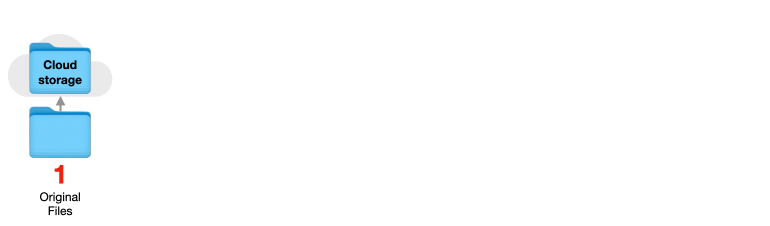
1. Working Copy
Make a copy of the client’s original folder and send the original folder into cloud storage for safe keeping – thereby ensuring the client’s original files are not affected by any of the following steps.
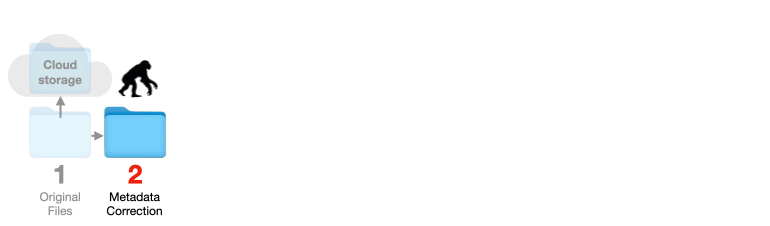
2. Metadata Correction
Analyse each audio file’s metadata and repair/correct if necessary to prevent the inexplicable “I don’t understand, it worked perfectly yesterday” problems and the bounce issues that inevitably occur when one or more files in a session have metadata problems such as incorrect file sizes and missing EOF conditions. I consider this to be a vital first step when receiving files from someone else to mix – especially if the client has bounced those files out of a DAW after doing all of their desired edits, auto-tuning, and so on.
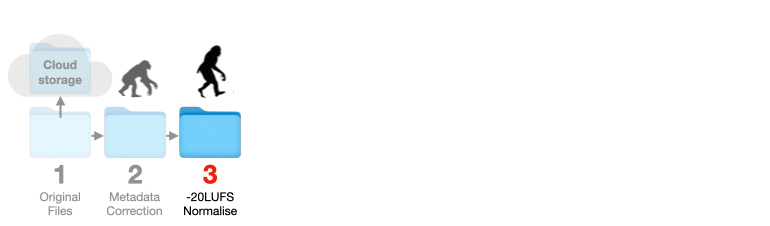
3. -20LUFS Normalisation
Adjust each file’s loudness to sit around -20LUFS unless this causes its peak level to exceed -1dBTP, in which case reduce the level so it does not exceed -1dBTP and make a note of the applied level reduction. This is a simple analysis and gain process that can be done by the AI before the file is placed into the session. The benefits of this intelligent normalisation are explained in step eight.
[I currently use Zynaptiq’s Myriad batch processing app for steps two and three above. (‘Batch processing’ simply means all the files can be loaded in at once and have the same processing to all of them, or selected groups, at the press of a button.) For step two it identifies any metadata issues and offers a choice of ways it can correct them, along with the pros and cons of each approach. This is a purely objective process that an AI could do while also implementing ‘best choice’ solutions based on the context and type of problem, leaving less of the decision making for me. For step three Myriad lists the current LUFS and TP values of each file, and can simultaneously normalise all files (or a selection of files) to a given loudness value. If the supplied files’ LUFS and TP levels vary wildly between each other, I use a spreadsheet that calculates how much gain I can safely apply to each file to keep them all files at the same LUFS level before loading them into the session file. This is objective ‘grunt work’ that an AI can perform and follow through as described in step eight.]
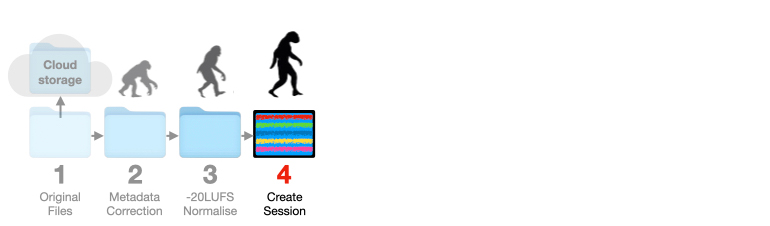
4. Create The Session
Create a session and load the checked and adjusted files from the previous steps in the order I’d usually place them, grouping related sounds together (e.g. bass DI channel next to bass mic channel). Name all tracks and channel strips according to their file names. I can abbreviate the names to something more intuitive later if necessary, but if there’s something wrong or dubious with a file I want to know at a glance the name it was supplied with to ease communications with the client.
5. Plug-Ins & Sends
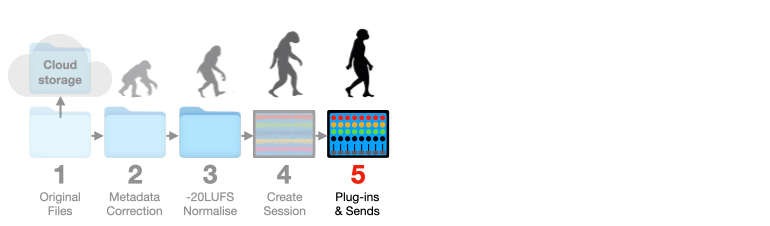
The AI will insert the plug-ins I typically start with on each channel strip: one corrective EQ followed by one corrective compressor followed by one enhancing EQ and one integrating EQ, as described in the fourth and fifth instalments of my Mixing With Headphones series. All plug-ins are the same on every channel, just like in the days of analogue consoles where every channel strip had the same EQ and the same dynamics processing (if it had any dynamics processing at all) and engineers got on with mixing the music rather than pondering which plug-ins would be the best choice, because there was no choice – except maybe two or three processors in the effects rack that had to be connected via a patch bay and cables. Note that all plug-ins are bypassed at this point. The AI will enable a channel’s corrective EQ if required in step six, and will enable a channel’s corrective compression if required in step eight.
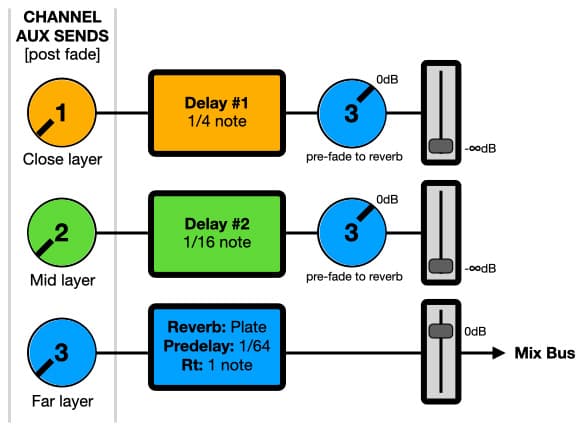
Also during this stage the AI will set up my usual spatial processing configurations: creating additional channels into the mix for each of my spatial processors, setting up auxiliary sends to access them, and setting ‘start point’ predelays, reverberation times and similar parameters based on the music’s tempo (as explained in the sixth instalment of my Mixing With Headphones series).
6. De-Guffing With HPF
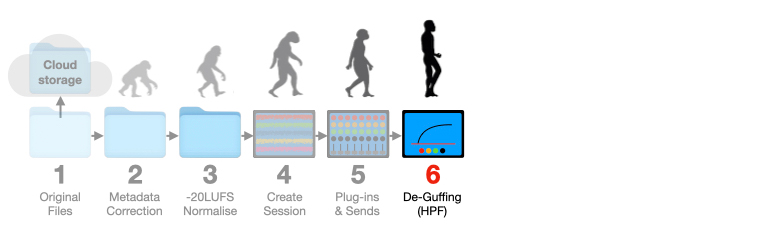
The AI will find the lowest frequency of musical value in each track (based on the frequencies of the notes in the music’s scale) and set a high pass filter at the appropriate frequency and slope on each channel’s corrective EQ to remove any low frequency guff the AI assumes will have no musical value.
I’ll double-check the AI’s choices as I work through the mix – but I don’t want that guff getting in the way while I’m making EQ decisions. I also don’t want inaudible, unnecessary or non-musical subsonics influencing the behaviour of dynamics processors or forcing my monitor speakers to reproduce frequencies they cannot without compromising their performance. I’d rather start with that low frequency guff removed and ease it back in if desired.
7. Temporary Mutes
Apply mute automation to any non-musical parts at the start, end and during tracks (count-ins, chat between musicians, etc.). I don’t want these things deleted, just temporarily muted, because sometimes they add value to the mix from a performance point of view. I’ll be checking their potential value to the mix later.
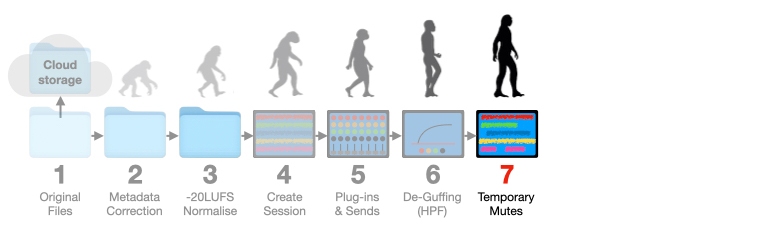
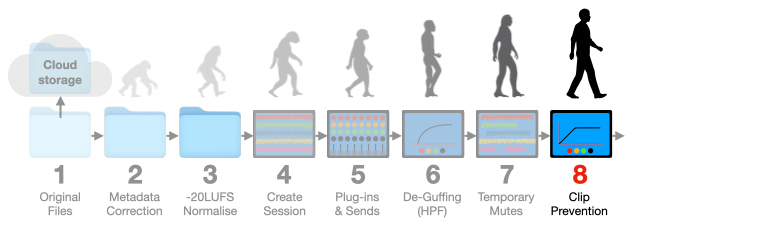
8. Clip Prevention
Tracks that had their loudness level reduced below -20LUFS to prevent exceeding -1dBTP (as described in step three above) will be re-assessed in case their peak levels have decreased after the removal of unnecessary LF energy (step six). Tracks that still have excessive peaks will have those peaks reduced by the corrective compressor in the channel strip. The AI will apply ‘low threshold/low ratio’ compression using objective mathematics (as demonstrated in the fifth instalment of my Mixing With Headphones series) to prevent those tracks from clipping – regardless of whether the result sounds good or not. Making that corrective compression sound good is a subjective thing I’ll do later; all the AI has done is ensure the sound is at a usable level to start the mix without clipping. Every channel that has this type of corrective compression applied by the AI will have a red fader top, indicating that I should check it. It’s also possible that the corrective compression has resulted in a higher LUFS level, which is addressed in the next step.
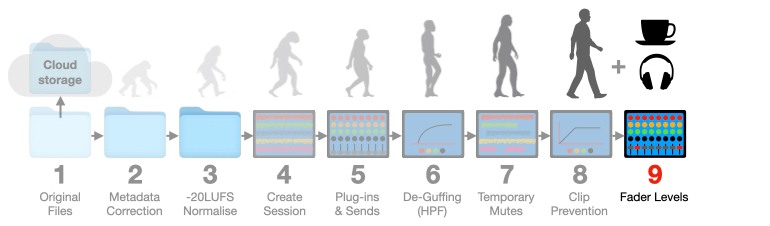
9. Fader Levels
Due to the steps above I know that all tracks have approximately the same loudness level of -20LUFS – other than those with excessive peak levels (which were made lower in level in step three, but might now be perceived as louder due to the corrective compression applied in step eight) and those that had significant subsonics removed in step six (which may now have lower overall levels).
This final step in the set-up puts all channel faders to the same level, determined by the AI to provide an average of 20dB of headroom above -20LUFS through each channel strip. The channels are then muted. For the sake of this discussion we’ll call this the ‘norm’ position. Tracks that have altered levels due to corrective compression (step eight) and/or corrective EQ (step six) will have their levels compensated with the plug-in’s output level control if available and sufficient. If not, their levels will be compensated by the fader and indicated with a red fader top (if not already).
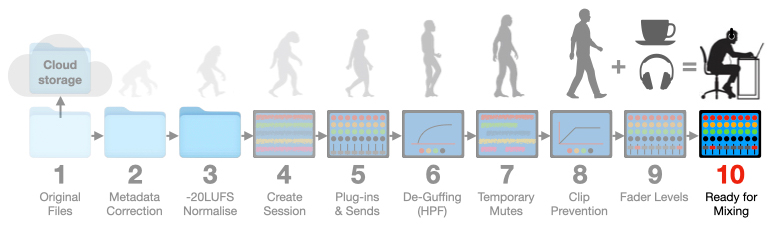
10. Ready For Mixing
Most of my tracks are now sitting around -20LUFS and have about 20dB of headroom above that nominal level in their channel strips. This creates an equivalent to the traditional analogue studios of the past, where every track was recorded at a nominal level of 0dBVU (and therefore at approximately the same perceived level) and every channel strip had at least 20dB of headroom above that nominal level of 0dBVU. This is a starting configuration I’m very comfortable with because it’s what I learnt to record and mix in. It’s also a good starting point for the AI to create its own balances from if required (more about those later), and is invaluable when using plug-ins that emulate vintage compressors and limiters because those devices’ thresholds were intended for use in analogue systems that had similar signal characteristics to those created through the steps above.
Sleeves Up & Get Working
The steps above represent the worse-case process I go through when preparing a mixing session using files I did not record myself, although some of the steps have been both simplified and taken further due to the AI’s capabilities. Now it’s time to check the AI’s decisions by briefly soloing each track before rolling up my sleeves and getting to work.
Perhaps the AI set a channel’s HPF too high (step six), and lowering it an octave adds inexplicable ‘weight’ to a sound despite having no identifiable musical value. Perhaps a sound that’s been compressed/limited due to excessive dynamics (step eight) was never intended to be very loud in the mix and therefore doesn’t need any compression or peak limiting. Perhaps a 1/64th note pre-delay for reverberation is too short for any of the spaces I want to create for the mix (step five). Perhaps I like the ‘up’ vibe of the muted chit-chat between the drummer and bass player at the end (step seven) and want to include it in the fade out.
I can change any of the AI’s decisions at any time, but, assuming all is well, I’ll be starting my mix from a well-informed position based on my own preferences…
From a stability point of view, I know that all of the tracks have had their metadata checked and corrected, so I won’t expect any last-minute surprises during bouncing or saving.
Tonally, I know that most of my tracks will be sitting around the same point on the Equal Loudness Contours when heard on the mix bus, ensuring my initial corrective EQ and enhancing EQ decisions are made in the same tonal context – and that will remain true until I start pushing faders around, at which point I might tweak my enhancing EQ while also using my integrating EQ to help sounds sit alongside each other in the mix (as demonstrated in the fourth instalment of my Mixing With Headphones series).
Dynamically, I know that channels with red fader tops need my attention. In most cases the red fader top indicates the AI’s corrective compression has been applied in a purely objective manner to prevent clipping (as described in step eight) and will probably need altering to achieve a musically acceptable result – considering a) the dynamics of the track and its role in the music, b) the dynamic perspective I’m working in for the mix, and c) the dynamic limitations of the release medium. There’s no point in allowing peak levels in a mix that I know will be problematic downstream for mastering and/or distribution. Prevention is better than cure. If I’ve changed the AI’s objective settings on a corrective compressor the red fader top will return to its normal colour. In the remaining cases it means the corrective compression or corrective EQ plug-in used on a channel strip had insufficient or no output level control, and the signal level was balanced against the others using the fader (as explained in step nine).
Spatially, I know that my preferred reverbs and delays have been set up on auxiliary sends and are returned into the mix via their own channel strips – meaning they can have EQ and other plug-ins applied to them, and each effect can be sent into another to create layers (more about that in the sixth instalment of my Mixing With Headphones series). Each channel’s auxiliary sends have been set to post-fade and their send levels reduced to -∞dB (i.e. off). Each auxiliary send’s master level has been set to 0dB, and each spatial effects’ fader to the mix bus has also been set to 0dB. To apply a spatial effect to a track I simply need to turn up the appropriate auxiliary send on that track’s channel strip – the rest of the effect’s signal path is open and ready to go.
The future has already arrived. It’s just not evenly distributed yet.
– William Gibson
With coffee in hand, butt on seat and headphones on head, I’m ready to start mixing the session. I’m using a remotely backed-up set of files with no metadata errors, no excessive peaks or subsonic surprises, and no complex patching headaches – yet all I’ve done is point the AI-assisted DAW to the folder containing the client’s original files, told it to prepare a mixing session, and wandered off to get my morning coffee (a necessary part of my daily ‘becoming human’ routine). The AI-assisted DAW did all of the time-consuming grunt work and brain-draining screwdriver work for me, in the way that I like it done. I can now audition the tracks one at a time, in groups, or altogether – whatever feels like the right way to start the mix.
The steps described above can sometimes take me up to an hour to complete and leave me mentally exhausted before I’ve even started mixing. An AI-assisted DAW could probably do it all in five minutes – especially if the AI’s hardware was built into the device running the DAW (as it is with the Apple Intelligence and Logic Pro combo) or is directly connected to the device rather than using a wireless internet connection. That’s a potential saving of an hour at the start of a session. I’d still charge the client for the agreed time/price, but I’d use that time saved by the AI, along with my fresh mind, to get everything ‘just right’ rather than ‘good enough’, and ultimately create a better mix that serves the music (as discussed below).
FURTHER CAPABILITIES
The 10 steps described above are simple tasks for an on-device AI, and could be set into motion by selecting a menu item (e.g. ‘Set Up Session’), navigating to the folder that contains the client’s files, and clicking on ‘Start’. The mix engineer can then make a coffee, have a shower, check the socials or whatever while the AI-assisted DAW does the grunt work and screwdriver work of preparing a session for mixing.
That’s great for setting up, but what about during the mix?
Apart from asking the AI to create a balance to start a mix from or to send as a preview to the client (we’ll discuss the differences between a ‘balance’ and a ‘mix’ shortly), here’s a brief wish-list of useful tools I’d be asking for. No doubt you can think of more…
I’d like to select a track and click on a menu item ( ‘Auto Adjust’) that tells the AI to provide a basic tonal and dynamic adjustment of the track. It’s an advanced version of steps six and eight above, but refers to its pre-trained knowledge of spectral references and dynamic references relevant to the sound source and the genre. An ‘intensity’ control would allow the processing to be increased or decreased with a single slider – similar to the auto-adjust feature found in photo editing apps, where increasing or decreasing the overall effect creates individually scaled changes across many parameters at once.
I’d like to select two or more tracks that are competing with each other in the mix despite my best efforts, and choose a menu item (‘Separation’) that tells the AI to attempt a solution using the current plug-ins and settings as prompts for the outcome I’m aiming for. I can undo it if I don’t like it, alter its strength if the result is too extreme or not extreme enough, or request another solution.
Conversely I’d like to select two or more tracks that feel too separated and choose a menu item (‘Ensemble’) that tells the AI to attempt a solution that reduces the separation between them (e.g. making a close-miked drum kit sound like a single instrument – which it is), again using the current plug-ins and settings as prompts for the outcome I’m aiming for. I can undo it if I don’t like it, alter its strength if the result is too extreme or not extreme enough, or request another solution.
Similarly, if I can’t get a track into the correct dynamic perspective in the most transparent way possible, I’d like to select the track and choose a menu item (‘Match Dynamics’) that tells the AI to attempt a solution by using the existing plug-ins and settings as prompts for the musical dynamic range I’m aiming for (the concept of musical dynamic range is explained in the fifth instalment of my Mixing With Headphones series). The end result might not sound as good as I’d want it to, in which case I was probably striving for an unrealistic outcome to begin with. Sometimes it’s impossible to make a sound with wide musical dynamic range sit comfortably in a mix with a narrow musical dynamic range while maintaining the same tonal qualities. As Roger Miller wisely advised, “You can’t roller-skate in a buffalo herd.”
All of the things mentioned so far in this article are better for me, and they’re better for the client. Everyone wins because the AI has been trained on my working methods and my understanding of the work. It’s doing the grunt work and the objective calculations much faster than I could, and it’s leaving the subjective decisions, creative ideas and time savings to me. Everything is as it should be in the human/AI relationship – unless you work as an assistant engineer, in which case you’re being shuffled aboard the same lifeboat as the readers and compositors mentioned in the first instalment of this series. More about that problem in the following instalments…
SERVING THE MUSIC
I’m confident that my mixes will always be musically superior than any mixes that today’s Narrow AI can create. Why such confidence? Let’s start at the very beginning, a very good place to start…
In the earliest days of my audio engineering career I learnt that musicians would always choose a bad recording of a good performance over a good recording of a bad performance. The bad recording obviously had some imperfections – maybe too much tape hiss, or a moment of clipping on one of 24 tracks – but if it was a good performance the musicians would always choose to move on rather than record it again at the whim of a technical perfectionist like me. Perhaps it was a time limitation, perhaps they couldn’t hear the technical problem, or perhaps they quietly knew it was the best performance that musician was ever likely to give. Whatever the case, I had no choice but to live with this technical problem, and eventually it became the loudest thing I’d hear in the recording. It haunted me. There was a sense of dread as it approached, a sense of regret as it passed, and every time I’d tell myself, “If only I’d taken a moment longer…”
Knowing that a good performance would always beat a good recording pushed me towards refining my recording and mixing skills until they became fast and instinctive, which, along with heightened attitude maintenance (dealing with size 10 musicians wearing size 20 egos), allowed me to aim for the triple win of making good recordings and good mixes of good performances. In other words, using my skills to serve the music – which requires some inherently human sensitivities that current Narrow AI does not have the sensory inputs for. Let’s explore them…
If only I’d taken a moment longer…
Performer Expression
As mixing engineers, it’s important to do more than just hear the music. We have to feel it and ‘tune in’ to what the performer was feeling at the time. There are always parts in a musical performance where it feels as if a musician is stepping forward on the imaginary stage and leaning harder into their part, or stepping back on the imaginary stage and relaxing into their part. If we solo the track, close our eyes, listen closely and perhaps even pretend we’re playing it, those parts soon become obvious. They’re always worth pushing a little bit harder or softer in the mix to see if it serves the music. How much is a ‘little bit’? Keep reading…
Listener Reaction
When mixing a song or piece of music there are often parts that I (and others, if not working alone) will naturally sing along with, play air drums to or have similar reactions whenever they occur. These are generally known as ‘hooks’ and are worth subtly and momentarily emphasising to further serve the music. This momentary emphasising was, and still is, commonly done by increasing the hook’s prominence in the mix (more about prominence in the third instalment), highlighting it with a reinforcing echo or with more subtle mixing tricks intended to grab and hold the listener’s attention in a barely perceptible manner.
Similar to hooks are ‘trawls’; moments that make the listener stare out to the horizon as if the music is towing them into a sea of nostalgia. As with hooks, I always try to identify trawls and subtly emphasise their causes.
There are also moments in a song or piece of music that are not hooks or trawls but create involuntarily reactions in the listener nonetheless, such as toe tapping, head nodding, smiling, finger conducting, playing air instruments (as shown below) and similar.
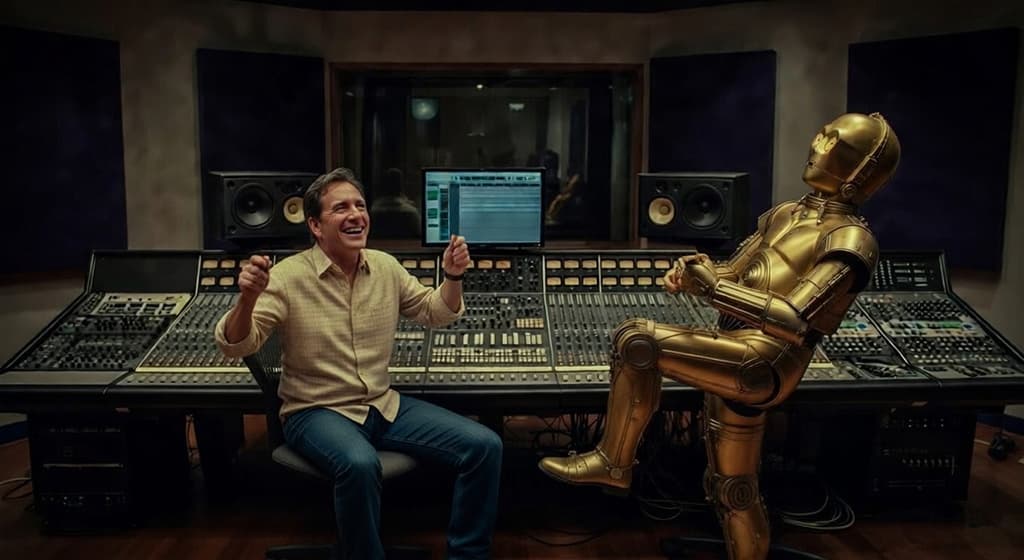
All of these reactions are indications that the listener is engaging deeper with the music at that moment, and typically rely on adrenalin, evoked emotions, nostalgia (reflecting on past-lived moments) or vicarious participation (amplifying their enjoyment by becoming an imaginary part of the performance). As with performance expression, they’re always worth pushing a little bit harder or softer in the mix to serve the music.
They’re also all things that today’s Narrow AI cannot identify because it is literally ‘in the box’ and cannot see, hear or feel the reactions of those listening to the music – let alone know what those reactions mean or how to respond to them in the mix.
The Just Noticeable Difference
The ‘serve the music’ changes in the mix, as described above, belong to the science of psychophysics and are typically created with small changes of numerous settings (e.g. ±0.5dB). They’re known as JNDs (‘Just Noticeable Differences’) that change a performance’s prominence within the mix in a barely perceivable manner. Recognising and responding to these moments in the mixing process is often what makes the difference between a balance and a mix, because we are attempting to make changes to how a part feels without obviously changing how it sounds. When done well, these subtle changes shouldn’t be noticed by the average listener unless the part is looped and the changes are switched in and out midway through the loop – which is how you know you’ve got it right, by the way. They’re just noticeable differences…
A BALANCE OR A MIX?
Depending on which aspect of the audio industry you work in, the words ‘balance’ and ‘mix’ often refer to the same thing. However, as AI finds its way into the audio workplace we have to clarify our definitions of those words to form a distinction in the market’s mind between the objective and subjective aspects of our work.
For the purposes of this series, we’ll define a balance as something where all of the elements of the song or music are sitting together in the correct contexts, and all parts can be heard relatively clearly from start to end with few, if any, changes required. It’s like the monitoring mix you might end up with at the end of the last tracking/overdubbing session – it’s hard to find fault with objectively because everything is there and sufficiently represented, but it’s a relatively static mix that makes no attempt to change in response to performance expression or listener reaction. Therefore it makes no attempt to serve the music.
This is what we could expect from an AI-assisted DAW as described earlier, using its pre-trained knowledge, validation, reinforcement training and in-the-box training. It’s something the AI-assisted DAW could create in a minute or two, and then make a few tweaks if prompted appropriately. Vocals not loud enough? Just put the vocal fader into prominence mode (discussed in the third instalment), give it a nudge upwards (which prompts the AI that the vocals aren’t prominent enough in the current mix), and let the AI do the rest. It won’t be perfect, but for cash-strapped musicians it might be good enough for social media’s low bar, broad access and poor return-on-investment. We’ll call that a balance. It’s the technically-correct objective blend that represents the sounds in the recording but does not attempt to serve the music they create – because the AI-assisted DAW does not have the required sensory inputs or any lived experience. A balance is, therefore, the non-human budget option.
A mix goes beyond a balance. It’s a blend of the recorded sounds that’s made by a mix engineer, perhaps with feedback from others in the room, where more creative attention is paid to the use of processing and effects to bring out the most of each sound, how it interacts with the other sounds, and how it affects the listener. Where appropriate, it includes barely perceptible changes (JNDs, as mentioned above) that increase a part’s prominence when a performance feels as if the player is stepping up to the front of the imaginary stage, and decreases the part’s prominence when it feels as if the player is stepping back. An AI-assisted DAW can do the objective processes of changing a sound’s prominence (it often require many imperceptible changes occurring at once), but needs the mix engineer to guide it. When changes are made to a balance to serve the music, the balance becomes a mix, and a mix is the human-made premium option.
A balance represents the recording, a mix serves the music.
By doing the grunt work of setting up and balancing, an AI-assisted DAW provides the extra time required to turn a balance into a mix. If it saved one hour of the allocated session time, it means there’s an extra hour available for fine-tuning sounds and making as many serve the music changes as possible.
From this point on throughout this series, we’ll use the words balance and mix in accordance with the definitions above…
MIX ANALYTICS
It’s not beyond the capabilities of Narrow AI to create an acceptable balance of sounds, but, as discussed above, that balance will always benefit from serve the music tweaks driven by the listener’s reaction to the music – turning the AI’s balance into the mix engineer’s mix. We’re unlikely to find any ‘hook’ or ‘trawl’ identification options in an AI-assisted DAW for now or in the near future. Or are we?
What if there was a way to track, measure and save a listener’s real-time subconscious reactions to a mix, and use those reactions as feedback to make the mix more engaging and therefore serve the music better?
It’s Not Exactly Brain Surgery
What was once the domain of New Age pseudo-scientists who profit from abusing technical terms they don’t understand, electroencephalography (EEG), or brain activity monitoring, has since become a common tool for market research. Using non-invasive portable headsets, market researchers can measure a participant’s immediate and subconscious responses to external stimuli in real-time.
The traditional method of using a ‘focus group’ still applies: a carefully selected group of people who belong to the target demographic attend a presentation about a specific product, service, concept or marketing campaign. However, rather than ticking boxes on a clipboard or expressing opinions in a discussion, each participant wears an EEG headset that provides the market researchers with objective data about the participant’s emotional engagement, attention, cognitive load (the mental effort required to process the information) and memory encoding. Because EEG measures the brain’s immediate response to stimuli, it avoids any biases or conditioning a participant may have towards the subject of the presentation. Not surprisingly, EEG has become a cornerstone of neuromarketing.
According to Gemini, “neuromarketing is the application of neuroscience and cognitive science to marketing, analysing subconscious consumer responses to products, brands and advertising. By using tools like EEG and eye-tracking, marketers measure emotional engagement and attention, revealing true consumer preferences in order to optimise campaigns and increase sales.“
Using EEG, marketers can tell if the stimulus (e.g. a product, service, concept or marketing campaign) elicits a positive or negative response from a participant. It also reveals how long the stimulus holds the participant’s attention. Hold that thought…
Musicians and others who create social media content are also marketers – whether they admit it or not – and if they’re successful it’s because their getting their content in front of a specific market niche, and their content is compelling enough to score well in terms of Likes and Engagement. What’s that got to do with EEGs and neuromarketing? If we consider the social media content to be the stimulus and the market niche to be the demographic, and we bring EEG into the process, we can consider a positive EEG response to be a Like, a negative EEG response to be a Dislike, and the ‘duration of attention’ to be Engagement. We have the Holy Trinity of algorithmic social media ranking encapsulated in the EEG data. Hold that thought, too…
Isolating specific brain activity and interpreting what it means has taken decades of research using things that look like this:
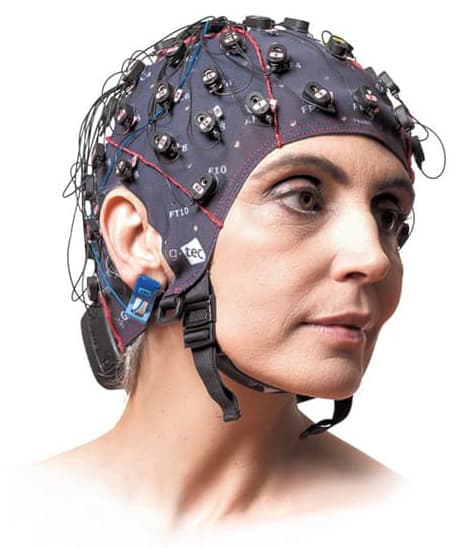
The EEG headset shown above looks like a swimming cap covered in sensors. Each sensor is measuring tiny electrical impulses that occur at different points over the brain’s upper surface and pass through the skull, where they are measured by the sensors pressed against the scalp. These electrical impulses are caused by groups of neurons in the top few millimetres of the brain’s surface firing off tiny electrical discharges at about the same time. They repeat this behaviour on a regular basis, but the time intervals between impulses depends on the body’s current physiological needs and also in reaction to external stimuli. There’s an entire science dedicated to interpreting these electrical impulses and what they mean. Thankfully we don’t need to go very deep into that science. For our purposes we only need to know three things about these electrical impulses: when they occur, where they occur, and how fast the EEG can respond to them.
When?
How often the electrical impulses occur tells us what ‘state’ or ‘behavioural mode’ the brain is in:
In Delta state the electrical impulses occur four times per second or less, which indicates deep sleep.
In Theta state the electrical impulses occur between four and seven times per second, indicating drowsiness.
In Alpha state the electrical impulses occur between eight and 12 times per second, indicating an awake but relaxed condition.
In Beta state the electrical impulses occur between 13 and 30 times per second, and indicate active mental engagement.
Where?
Where the electrical impulses occur also tells us something useful. Putting aside the left/right brain theories and focusing instead on emotional states, electrical impulses in the left frontal lobe are indicative of approach-related emotions such as happiness and joy, while electrical impulses in the right frontal lobe are indicative of withdrawal-related emotions such as dislike and fear.
How Fast?
The EEG’s sensors directly measure the electrical activity of neurons, so electrical spikes (0.02s to 0.07s) and impulses (0.07s to 0.2s) are measured as they happen, effectively at millisecond scales. There might be some latency as the EEG’s software processes and presents this information to the operator, but for all intents and purposes it is essentially instant – certainly fast enough to associate a momentary response with a momentary stimulus, such as a brief but exciting hook in a song…
A Penny For Your Thoughts
We don’t need a swimming cap full of sensors to measure the things described above. We can do it with just two sensors, or two small clusters of sensors, one on each side of the head. Damn! If only there was an everyday audio tool that allowed us to place a sensor on each side of a listener’s head without making the listener look or feel stupid – which might skew the results. We’d be able to bring EEG data into the mixing process – fine-tuning our mixes, and perhaps the composition itself, to maximise listener engagement…

The active noise-cancelling headphones shown above, Neurable AI’s MW75, contain EEG sensors within their ear pads (the light grey squares) and currently work with a mobile app to present EEG data related to focus, productivity and drowsiness. In terms of build quality, comfort and sound quality, reviewers compare them favourably with other premium headphones that offer active noise cancelling.
EEG headphones such as these could provide an AI-assisted DAW with the information needed to expose strengths and weaknesses in the mix, or even in the music itself. Correlating the EEG data with the mix would reveal parts with high engagement (Beta state), parts the listener likes or dislikes (frontal hemisphere asymmetry plus engagement), parts where the listener relaxes into the music (Alpha state), boring parts (Theta state), and parts that send the listener to sleep (Delta state). This data could be measured throughout the duration of the music, entered into the AI-assisted DAW, and displayed as a trace on the session’s timeline called ‘Engagement’ or similar. This information would provide the mix engineer and the AI with an excellent indication of where parts of the mix would benefit from being pushed harder or softer, and where the mix is losing the listener’s attention. From a mixing point of view, at least, this information could be used to optimise listener engagement. Perfect for algorithm-driven music distribution platforms such as Spotify, that rely heavily on engagement as an indicator of what to recommend to a given demographic.
Ideally the EEG data would be gathered over a number of listeners. Some basic processing (essentially a clever form of integration) would remove irrelevant responses that are unique to an individual listener, and, from there, an Engagement trace could be displayed on the DAW in parallel with the tracks or overlaying them. A convenient way to capture enough EEG data would be to put the finished mix into a smart phone (before it’s uploaded to any distribution platform), and pass the headphones around half a dozen like-minded friends. This is essentially the same as the market researchers’ ‘focus group’, which typically contains five or six participants – enough to gauge a general consensus.
Unfortunately, the EEG headphones shown above are large and bulky to carry around, while also being visually conspicuous and capable of ruining a time-consuming hair-do – meaning the listener might feel uncomfortable about putting them on, and that could skew the data as mentioned earlier. The EEG data gathering process would be a lot easier if all that was needed was a smart phone and a set of earbuds…
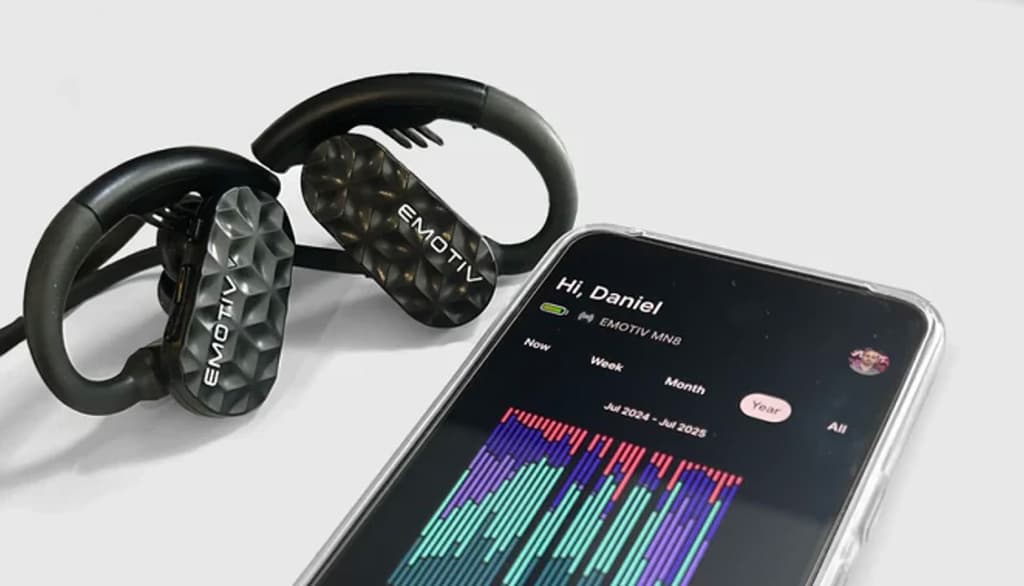
The product above is a pair of EEG earbuds and their related mobile app from Emotiv. The entire system fits in a pocket, the earbuds are sufficiently inconspicuous, and they won’t upset any hair-do. The operator (mix engineer or recording musician) could be watching the EEG data on their device’s screen in real-time, keeping an eye out for anomalies that have nothing to do with the music but coincide with events happening nearby – such as a spilt drink, a passing ambulance, or a thumbs-up from the hairdresser.
No matter how far-fetched this may seem, remember that market researchers have been using EEGs for years to determine if someone likes or dislikes something, regardless of their personal biases. It is, potentially, the ultimate measure of engagement… [Scroll down to ‘Other Uses of EEG’ more interesting applications of EEG and similar.]
SKULLDUGGERY
Everything discussed above is possible, and some of it is already on the market. EEG technology is well-established for market research, although it has only recently moved out of swimming caps and strap-on silicone squids and into headphones and earbuds. Mobile apps that interpret the EEG data are already in use, although the current interpretations are aimed at optimising personal focus and productivity. It would not be difficult to re-code that interpretation to show someone’s engagement while listening to a song or piece of music, reading a social media post, or watching a YouTube video. In areas where engagement matters, EEG could soon become part of the creative process: complete your project to the best of your abilities, test it on a handful of like-minded people to gather an appropriate amount of EEG feedback, make changes accordingly, test it again on the same people if you feel a need to, and upload the EEG optimised version when ready.
But let’s get back to our our AI-assisted DAW… In ‘A Balance Or A Mix?’ (scroll up) we defined a balance as something that represents the recording, and a mix as something that serves the music. We also saw that an AI-assisted DAW could not serve the music (and therefore only make a balance the represented the music) because it was lacking the human sensory inputs needed to judge performance expression and listener reaction. However, EEG data could provide an AI-assisted DAW with that sensory information at a very fundamental level. Combined with its ability to create prominence (see third instalment), it is possible that an AI-assisted DAW with EEG feedback could step up from making balances to making mixes – or at least something that sounds more like a mix than a balance. What are the chances of that happening? Read on…
AI-assisted DAWs are making their way into the audio world as you read this. Apple is leading the way with Apple Intelligence and Logic Pro (as discussed in the previous instalment of this series) – but cross-platform DAW manufacturers appear to be exploring ways to work with platforms that, unlike Apple’s offerings, don’t have AI integrated into their OS and their devices. We’ll be exploring some of the cross-platform possibilities in a later instalment of this series.
In the meantime… Apple’s Vision Pro headsets do not currently use EEG, but companies like Cognixion are developing specialised EEG headbands that replace the standard Vision Pro headband and allow people with severe speech and mobility impairments to control the headset through thought, gaze, or head movement. If these third party EEG headbands become popular and start being used for more than they’re currently designed for, with app developers finding other uses for them (i.e. the kind of thing that other EEG developers are currently doing), it would not be surprising to see Apple integrate EEG directly into their Vision Pro headbands and, from there, into their headphones and earbuds so that EEG data could be used as an extension of Apple Intelligence and as part of the Accessibility features built into their devices.
Coincidentally Apple have been making intelligent earbuds for some time now, capable of performing measurements within the listener’s ear canals to optimise the earbuds’ performance accordingly – all controlled by the device they’re BlueToothed to. Apple also happens to be one of the top four headphone manufacturers in the world, and at the time of this writing is the market leader in headphone sales. No other company in the world is better equipped to make an AI-assisted DAW as described in this instalment along with appropriate EEG earbuds and/or headphones to go with it. EEG feedback could be used not just for optimising the engagement of music, but also the engagement of videos, social media posts, blogs and other forms of content before they’re released into the world. The possibilities that EEG offers allow us to change the way we do things – a notion that has always been at the core of Apple’s existence. Engagement for the rest of us. But back to audio…
EEG gives an AI-assisted DAW the inherently human sensory inputs it is missing. It cannot see or hear the musicians and listeners in the room as the mix progresses, and it cannot gauge their reactions: singing along to certain parts, playing air instruments, tapping their feet, smiling or grimacing involuntarily, and so on. It has no lived experience. It cannot feel a performance, relate to a nostalgic moment, or experience a reaction. However, EEG gives it the fundamental information behind all of those human things. We can take this one step further by using EEG headphones in the studio, capturing a performer’s EEG data as they record their part – which would prove very useful for making mixes that serve the music. More about that later.
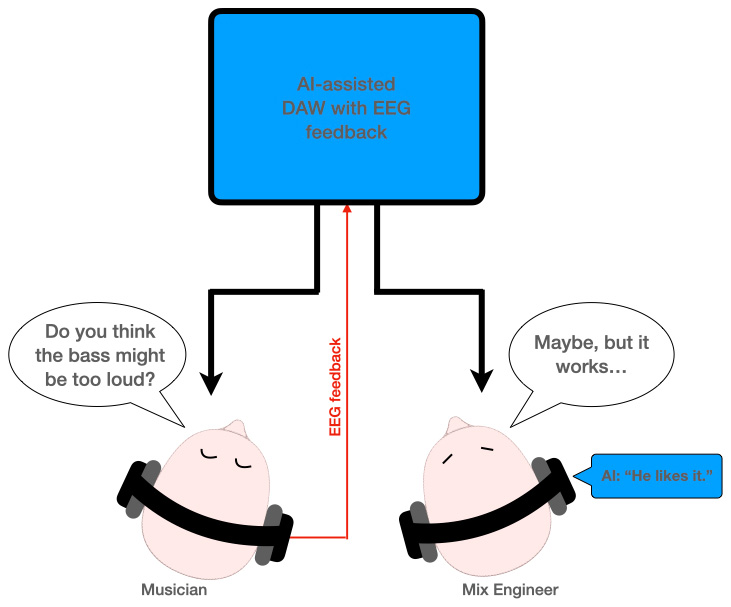
In a world driven by analytics and engagement, an AI-assisted DAW with EEG feedback allows everything to be tweaked for optimum listener engagement: including the composition itself and every sound and instrument, all the way through to mixing, mastering and promotion. These capabilities will become particularly interesting in later instalments of this series, when we look at AI-assisted DAWs for recording musicians…
[The grey-coloured text within this article was written by AI. Each section took less than 10 seconds to prompt, create and paste into this document, and required no preliminary research on my behalf. I did some fact-checking and hallucination-checking afterwards, then edited the text just as I would do with anybody else’s writing to bring it in line with AudioTechnology’s ‘voice’. In each case I was exploiting AI’s strengths (information gathering) and avoiding its weaknesses (judgements and opinions).]
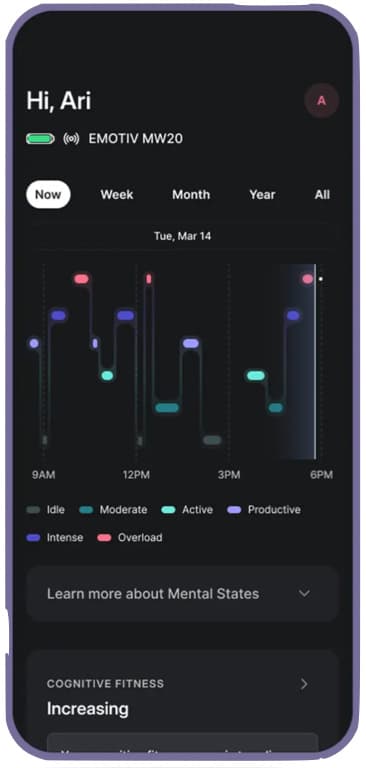
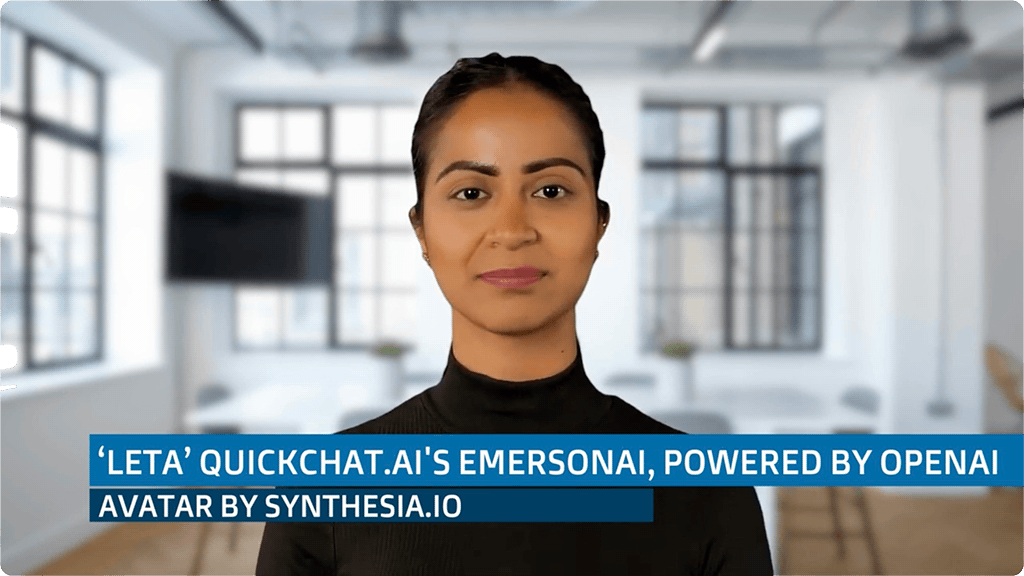
Over a two year period beginning in April 2021, Thompson had many text-based conversations with Leta as part of its/her development. He sent Leta’s responses to Synthesia.io, who created a Leta avatar along with text-to-speech conversion – as shown above. He then filmed himself asking Leta the same questions he had previously typed, and, with a bit of editing, turned those text-based conversations into engaging Q&A videos. It’s easy to forget that Leta is simply a program – although astute viewers will recognise the characteristic head movements that give away AI-generated humans.
There are over 60 videos, and they’re worth watching for an insightful example of AI reinforcement learning with human feedback (RLHF). The 25th video is a ‘best of’ compilation of excerpts from their early conversations, starting with Thompson’s initial introduction to Leta (shown in monochrome because it is before the testing started), through to their 24th conversation.





Hi Greg,
WOW! what an undertaking. There is so much information to absorb. This could be a submission for a PhD. Great work!
Thank you for the kind words, Cliff! The third instalment is now live, BTW. You can link to it from the end of the 2nd instalment.
There’s a lot I could say about all of this, but I’ll let the articles do the talking in a pro-active manner for now…