

PC Audio 103
Buying a powerful new PC so you can sell off all your audio hardware and do everything in-the-box? Don’t be so sure!

15 August 2014
Column: Martin Walker
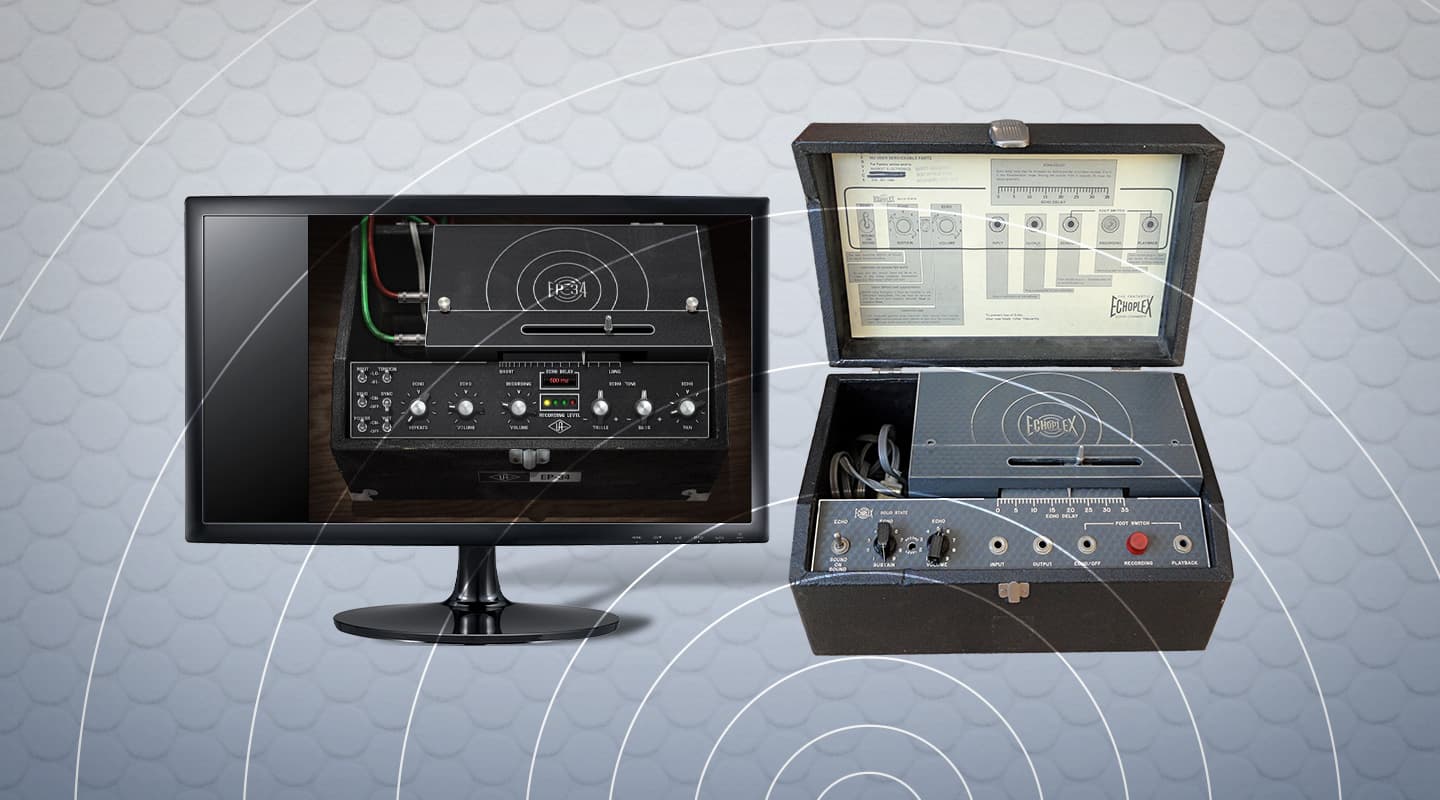
I recently volunteered to take a look at a good friend’s vintage Maestro Echoplex EP-3. This 40-year old delay effect (using a continuous loop tape cartridge and a sliding playback head to adjust the delay time) had returned from a mechanical repair working well, apart from very low echo replay volume. I’d never seen an Echoplex before, although I’d owned a Watkins Copicat myself in the dim and distant past and guessed it wouldn’t be too complex inside; thankfully, I was correct. I tracked down a service manual online, and sure enough the entire circuit contained just six transistors and one FET (for the high impedance guitar input), along with a handful of resistors, capacitors and diodes.
A few minutes with a voltmeter showed the circuits still seemed to be working fine, so I gave it a good clean with special attention to the tape path, demagnetised its heads and other metalwork, and then followed the service manual recalibration advice: first adjusting the playback and record head azimuth (basically twisting each head very slightly with pliers to maximise the playback level of a high frequency sine wave tone); followed by adjusting the record head bias oscillator level preset to ensure maximum undistorted output (the amount of bias required can vary markedly between different tape formulations used in the continuous loop tape cartridge). Collectively this did the trick, and the echo volume was now sufficient to achieve feedback mayhem once the echo sustain knob was set above about halfway. My friend was overjoyed that I’d managed to ‘raise his machine from the dead’ because he claimed it once again produced sounds he’d yet to hear from software plug-ins.
Now, this episode got me thinking on two levels (and here’s where we return to our usual topic of PC Audio). First, this Echoplex was a 40-year old device that I essentially managed to repair with a pair of pliers, a screwdriver, and a little elbow grease. Contrast this with today’s PCs, which many of us routinely put out to pasture at the ripe old age of three or four years old. Ironically, many of these computers still work perfectly well with the software that was first installed on them, but seem sluggish with the latest software, simply because this expects a more powerful machine. But what a waste of hardware to simply scrap it!
Second, the imperfections of this somewhat crude tape-based delay did indeed result in warm, rich and full-bodied sounds with loads of ‘life’ — along with wow, flutter, and a little hum and hiss — while setting the echo sustain level close to feedback produced wonderful runaway effects that I couldn’t reproduce with a string of software plug-ins across a month of Sundays. So what practical PC advice can we glean from this somewhat circuitous tale? Well, quite a lot actually! The reason this Echoplex could still be resurrected was because no-one had attempted to upgrade it along the way with a succession of non-standard parts, whereas we tend to keep upgrading our PCs to go faster and faster until they fall over, and then completely replace them.
Sometimes this makes perfect sense, but there’s often a hidden sting in the tail with this approach, and that’s compatibility of your new PC with your existing audio hardware toys. I’m thinking particularly of PCI soundcards (I still have three, though few of the latest PC motherboards have even a single PCI slot to plug them into), and Firewire audio interfaces (after a lot of popularity the Firewire port is fast disappearing from modern computers, and compatibility problems are on the increase even if you plug in a dedicated Firewire card to add a suitable port).
I come across a lot of musicians complaining in forums that they bought a new PC only to find they can no longer get their much-loved audio interface to work — either because there isn’t a suitable slot/port for it, or because its manufacturer hasn’t written suitable Windows 7/8 drivers for it (or are no longer in business at all). And there are also quite a few older ‘legacy’ devices with plenty still to offer that can’t be plugged into the latest PCs. Examples include Yamaha’s popular SW1000XG soundcard (essentially an MU100R synth on a PCI card with additional audio recording/playback facilities and five 24-bit effect busses), the Yamaha DS2416 DSP Factory card (which provides hard disk recording facilities but also contains the inner functions of a Yamaha 02R digital mixer), and the Lexicon Studio (which uses exactly the same core processing engine as the famous PCM90 reverb, taken out of its original rack housing and grafted on to a PCI soundcard). So, if you do have such devices, consider hanging on to your older PC so you can continue to run them, rather than declaring it obsolete.
The second important advice after buying a new and stunningly powerful PC that finally enables you to create tracks totally In-The-Box, is don’t immediately dispose of your outboard effects, guitar pedals and the like. While many software plug-ins are now stunningly good, there’s still something to be said for the real-world magic of analogue hardware effects, which can add an indefinable ‘something’ to a mix. I’ve lost count of the number of musicians who have flogged their audio hardware and subsequently regretted it, spending months and sometimes even years tracking down their old favourites for repurchase on the second-hand market. This is particularly true of analogue synths, which just like guitars have a tangible charm that software emulations rarely match. Yes, you can automate the software variety and put multiple instances of them in your mixes, but they rarely feel exactly the same as playing ‘the real thing’.
Now don’t get me wrong, PCs can do incredible things and nowadays, for so many different reasons, I could never make music without one. A few years ago I created an album entirely In-The-Box with my new PC, and was very pleased with it, but just like many others I’m now reincorporating external hardware into my music regime. The PC still gets used for all the very clever digital stuff — creating and replaying the many sounds it excels at, and giving me wonderful visual arrange pages that help me perfect my mixes — while acoustic and analogue electronic instruments and effects add a real-world patina to the proceedings and give the final sound an ‘edge’. All power to your PC, but don’t throw out the baby with the bathwater!








RESPONSES