

• Latest Issues
  • Reviews
  • Tutorials
    • Microphones
    • On The Bench
    • Thinking Outside the Box
    • View From The Bench
  • Features
    • Acoustics
    • Broadcast
    • DIY
    • Field Recording
    • Game Sound
    • Interview
    • Live Sound
    • Mastering
    • Mix Masters
    • Music Business
    • Name Behind the Name
    • Post Production
    • Recording
    • Studio Focus
    • Technical
  • Regulars
    • Fresh Produce
    • Top 5
    • Top 5 Live
    • Top 5 Template Tools
  • Videos
  • Free Stuff
  • By Gear
    • Audio Accesories
    • Audio Mixers
    • Headphones + IEM
    • Interfaces
    • Location Sound
    • Microphones
    • MIDI Controllers
    • Mobile/iOS
    • PA Systems
    • Software + Plug-ins
    • Studio Monitoring
    • Studio Outboard
    • Synthesizers + Keyboards
  • By Interest
    • Acoustics
    • Broadcast
    • DIY
    • Field Recording
    • Game Sound
    • Live Sound
    • Mastering
    • Music Business
    • Name Behind the Name
    • Post Production
    • Recording
    • Technical
    • Thinking Outside the Box
  • By Brand
  • Subscribe
  • Contact Us
  • Advertise
Previous
Issues 102
2 SHARE
Read Next: KeyLab 88 MK3 Released
  • Home
  • /
  • Regulars
  • /
  • Top 5 Template Tools
  • /
  • Top 5 Template Tools: Tim Palmer

Top 5 Template Tools: Tim Palmer

Veteran mix engineer Tim Palmer talks us through the most important plug-ins in his mix template.

By Joe Matera

11 March 2025

Now in the fifth decade of his illustrious career, English producer and mixing engineer, Tim Palmer has worked with a who’s who of the music industry – names such as Robert Plant and U2 to Pearl Jam and David Bowie to name but a few. When it comes to mixing, Palmer relies on five essential plug-ins. “When I start mixing a song, there are a few core plugins that form the foundation of my process,” he explains to AudioTechnology. “These workhorse tools allow me to shape the track before I dive into fine-tuning and creative enhancements. While I’ll often add more specialised plugins later, these five plug-ins consistently provide the control, warmth, and precision needed to hopefully bring a mix to life.”
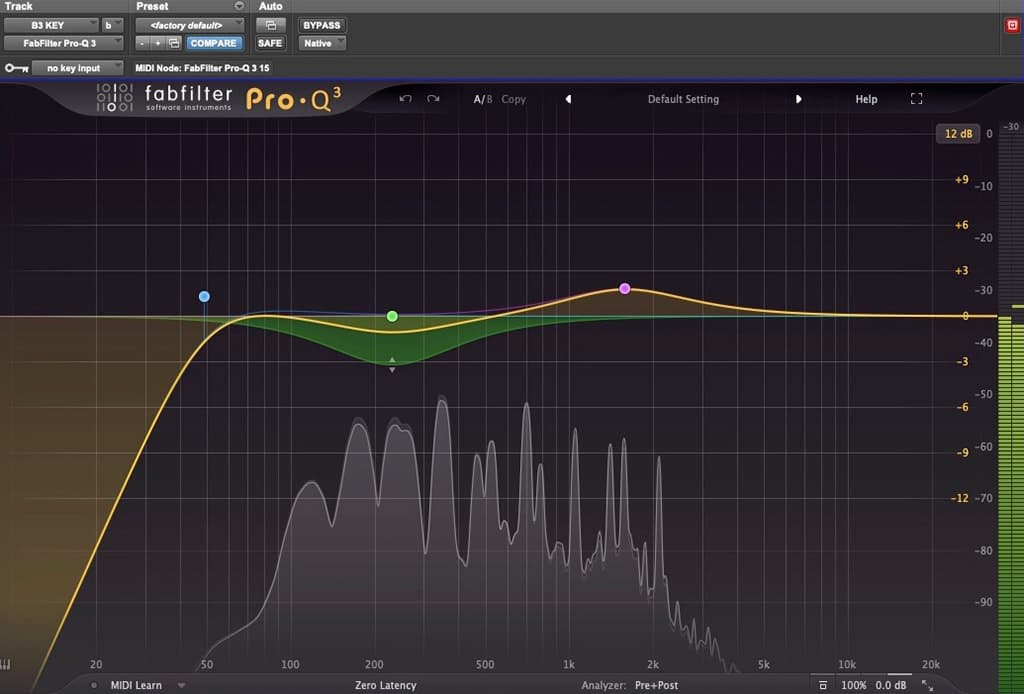
FABFILTER PRO-Q3

Surgical Yet Musical EQ: The FabFilter Pro-Q3 is my go-to EQ. For me it strikes the perfect balance between musicality and surgical precision. One of its standout features is the ability to EQ just the centre or the edges of a stereo image, offering incredible flexibility. The dynamic EQ functionality is also invaluable – when a frequency peaks too much, Pro-Q3 automatically tames it in real time, acting like a transparent and highly responsive compressor.

The interface is clean and intuitive, making it easy to shape the sound with simple mouse adjustments. The built-in spectrum analyser is particularly useful when something in a mix feels off but isn’t immediately obvious. Whether I need extreme filtering to remove unwanted frequencies or subtle adjustments for clarity, Pro-Q3 delivers pristine results without coloration.

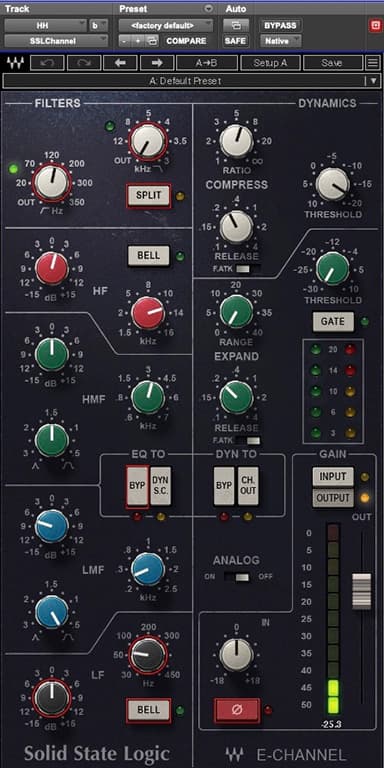
WAVES SSL 4000

The Sound of Familiarity: Having worked on SSL consoles since the early ’80s, the Waves SSL 4000 EQ feels like home to me. It retains the warmth and musicality of the classic SSL sound, making it a natural starting point before I reach for more surgical tools. The frequencies are familiar, and I can quickly dial in settings that feel right without overthinking.

One of the biggest advantages of this plugin is its built-in compressor and gate. While I don’t use the gate much these days, the compressor is perfect for adding general control over peaks and dynamics. The SSL 4000 doesn’t drain CPU power, which means I can use multiple instances without hesitation. For me, this EQ is an efficient, no-nonsense tool that gets the job done with the analogue character I love.

SOUNDTOYS ECHOBOY JR.

The Ultimate Delay: If you’ve heard my mixes, you know I love delay! The Soundtoys EchoBoy Jr. is my go-to delay plugin, offering the warmth of vintage analogue units, with modern flexibility. I typically roll off the high-end and lean toward more analogue-sounding delay modes to add texture. One of my favourite techniques is offsetting the delay slightly from the track’s tempo – when a delay is perfectly in time, it can blend in too much. By tweaking the timing just a little, I can make it stand out exactly as needed.

Another feature I love is the ping-pong mode, which adds movement and depth. I frequently automate feedback and delay amounts within Pro Tools, allowing for dynamic, evolving effects. And because I prefer my delays to have a bit of character, I often distort the return signal – clean delays don’t excite me unless they’re for a specific effect. EchoBoy Jr. has a beautiful degraded, vintage feel, making it an essential part of my sonic toolkit.

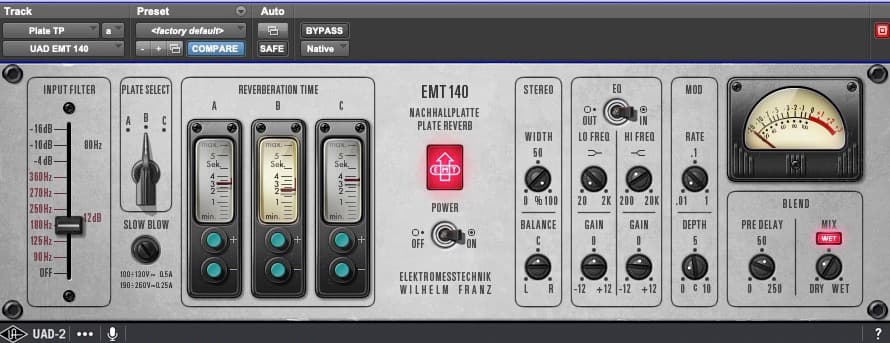
UAD EMT 140

The Classic Plate Reverb: Reverb plays a crucial role in creating depth, and the UAD EMT 140 remains my gold-standard plate reverb. Having used the original hardware units in studios since the ’80s, I can confidently say that this emulation is exceptionally accurate.

I love the warmth and smoothness of the EMT 140, particularly on vocals, drums, and guitars. It sits in a mix naturally, adding space without washing out the original sound. The pre-delay feature is particularly useful, allowing me to control how the reverb sits in the track. There’s also a slight saturation characteristic that gives it an authentic vintage tone.

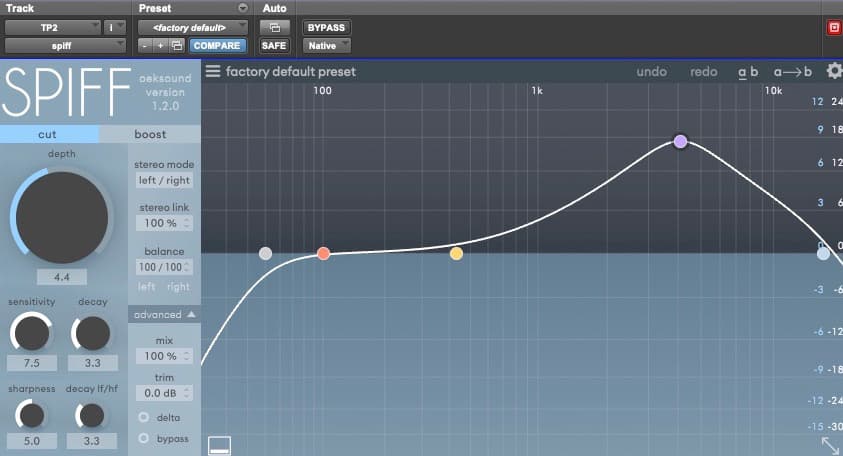
OEKSOUND SPIFF

Intelligent Transient Control: A more recent addition to my arsenal, Oeksound Spiff is a game-changer for transient shaping. Whether I’m working on acoustic guitars, vocals, or drum tracks, Spiff allows me to pinpoint and control problematic transients with surgical precision.

The plugin analyses the signal in real time and detects transients, allowing me to either enhance or suppress them as needed. For instance, I can reduce pick noise on an acoustic guitar or tame harsh snare drum frequencies in overhead mics without affecting the overall mix. It’s also great for removing unwanted mouth clicks or subtle imperfections in a vocal take.

What sets Spiff apart is its frequency-specific approach – instead of applying a blanket adjustment, it only affects the problem areas, leaving the rest of the sound untouched. Originally designed for voice processing, it has become an essential tool for shaping and controlling transients across an entire mix.

RESPONSES

Leave a Reply Cancel reply

Your email address will not be published. Required fields are marked *

  1. Chris Corby says:
    30 May 2025 at 10:41 am

    I’ve had the privledge of being in the room with Tim Palmer while in mix mode and it was a pivitol learning and liberating experience for me. Always very generous with advice and tips along the way and just stunning next level mixing!

    Reply
  2. Vic Stathopoulos says:
    30 May 2025 at 11:51 am

    Very interesting Top 5. Never tried the Fab Filter EQ, I use Sonnox Eq which I like alot. WAVES SSL 4000 is one of my favourites I use the Chris Lorde Alge preset Guitar Amp 1 preset as my first plugin. The UAD EMT 140 sounds good, but I prefer Metric Halo Haloverb, it doesn’t use much CPU and sounds great. Havn’t tried OEKSOUND SPIFF. My Top 5 is: Waves SSL 4000, Line 6 Pod Farm 2.5 like the Vintage Vocal preset. The preset features a preset that sort of sounds like a Neve 1073 and that is great adding also as first plugin. My 3rd Favourite Plugin is Sonnox Dynamics – its sounds really good. I have tried alot of compressors, but I always go back to this one. Waves Puigchild is pretty good for guitar and adds a bit of depth if added to the Master Channel. My 4th favourite plugin is Waves Pugitec, I just use it for its sounds and its default setting. I usually place it as the last plugin in a track and also use it for its vdu meters. My 5th Favourite is Metric Halo’s Channel Strip. It has lots of useful presets. It was one of the first software channel strips I tried and it still sounds good.

    Reply

More for you

Filter by
Post Page
Regulars Top 5 Template Tools Issue 110 Issue 109 Issue 108 Issue 107 Issue 106 Issue 105 Virtual Instruments Software + Plug-ins Feature Recording Plug-ins Arturia Cherry Audio Issue 103
Sort by

Top 5 Pro Tools Template: Neil Davidge

19

Top 5 Pro Tools Template: Guy Gray

19

Top 5 Template Tools: Jacquire King


19

Top 5 Template Tools: Warren Huart

19

Top 5 Template Tools: Joe Chiccarelli

19

Top 5 Template Tools: Jeff Balding

19

A Synth on Fire

10

UJAM Expands UFX Effects

10

Recording A Live Session with The Grogans

10

Shape Your Attack

10

Cherry Audio Trident MK III

10

University of Wollongong Immersive Studio

10

preview
preview

Free! Get AudioTechnology magazine sent straight to your inbox every month

This field is for validation purposes and should be left unchanged.

preview
  • Latest Issues
  • Reviews
  • Tutorials
  • Features
  • Regulars
  • Videos
  • Free Stuff
  • By Gear
  • By Interest
  • By Brand
© 2026 AudioTechnology magazine.