





Review: Bitwig Studio 2.3
Bitwig continues to make big strides at the forefront of music production.

By Preshan John
10 March 2018
It might not be as ubiquitous as Ableton Live but Bitwig Studio continues to establish itself as a heavyweight DAW for electronic music production and DJing. The developers have been hard at work improving studio and live workflows on the latest version, Bitwig Studio 2.3. Here’s some of the goodies:
PHASE-4
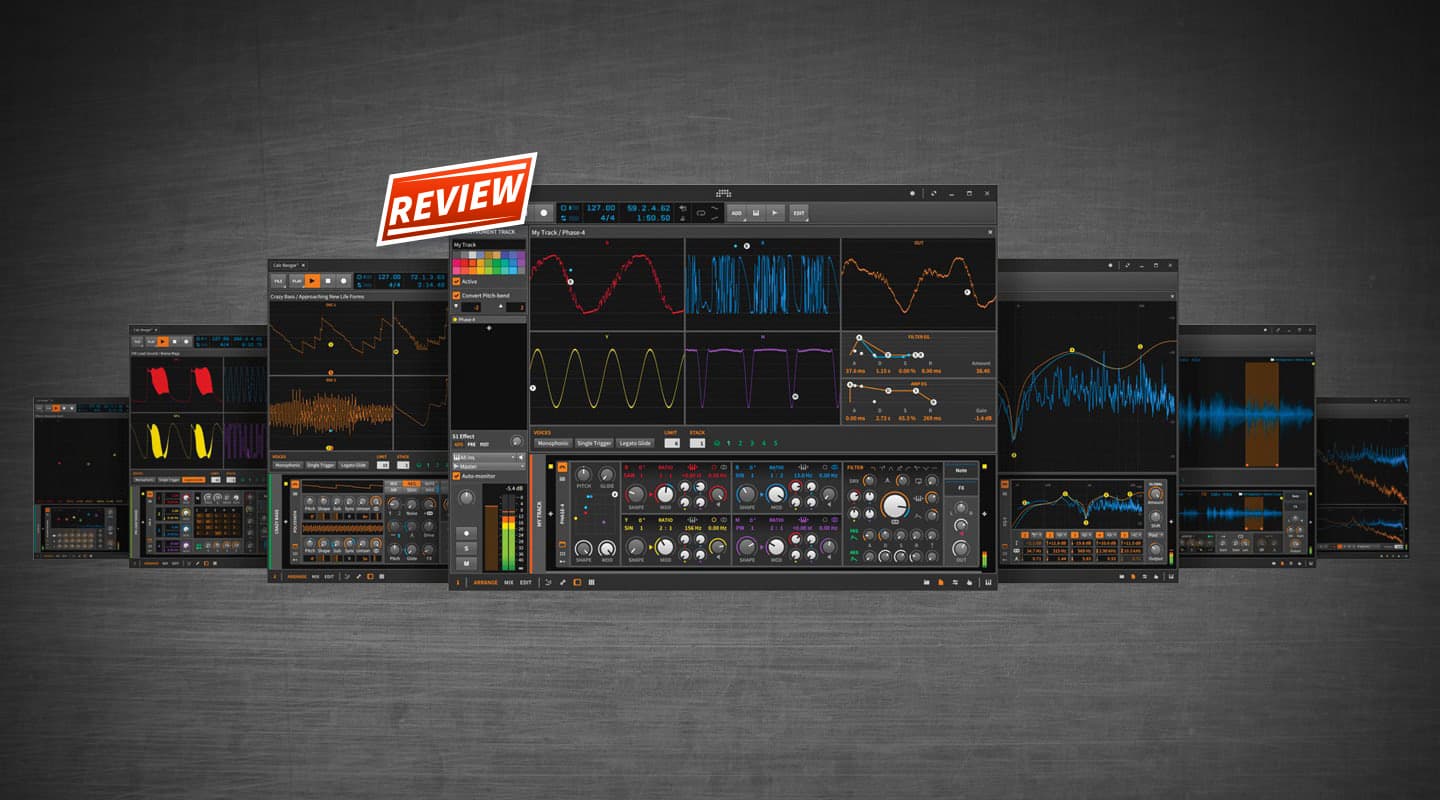
The banner highlight is a brand new synth called Phase-4; it has four oscillators and it generates complex sounds with phase manipulation. The four main sections appear in a grid, each with identical controls but colour-coded according to their quadrant: red, blue, yellow and purple. Within each oscillator box you can change the wave shape, choose from a few different formants, fine-adjust pitch, bring the wave in and out of phase with the other three, feed any oscillator into another, and do some other deep and heavy-handed phase mangling. It didn’t take long to lose myself in the craziness of it all. Basses, leads, DX7-type patches… it’s all possible with Phase-4.
EXPANDED DEVICE VIEW
When an instrument has this many knobs and switches, sometimes you just need more screen real estate. Bitwig 2.3 brings expanded device view for seven of its own devices, including Phase-4. The little Device Interface button in the bottom left hand corner extrapolates the GUI in the main window. Alternatively, you can turn it into a floating window by clicking the detach button at the top right hand corner. It really eases the tweaking process. For example, Phase-4’s expanded view gives you a brilliant visual readout of the interplay between the four oscillators by showing each of the synth’s waveforms in real-time, plus the resultant output waveform.
TIME STRETCHING
Stretch and Stretch HD — Bitwig’s original time stretching algorithms — are now two of several other options to pull and squeeze chunks of audio. Bitwig borrows technology from zplane’s Elastique algorithm to offer more granular and spectral stretching options. There are heaps of flavours here, and you’re sure to find something to whip your audio into shape. Both corrective and creative time stretching are made easy and Bitwig manages to present all the options in a logical layout. The Elastique variants are excellent — it’s really quite amazing how much you can get away with. Choose between Solo, Pro or Eco depending on the harmonic and transient content of your source audio. Formant gives you control over grain length for granular stretching, turning it into a creative minefield when paired with automation.
INSTRUMENT & EFFECT SELECTOR
A new device called Instrument Selector joins the ranks, and it lets you load multiple instruments onto a single track (or multiple effects on an effects track) as layers. Only one layer can be played at a time. Layer selection can be automated and the Remote Controls follow your choice and map accordingly. Switching between instruments in the selector is instantaneous and seamless — especially handy if you’re playing live where you can jump between patches without asking too much of your CPU. Bitwig says there’ll be no hard breaks or clicks when switching, and your sustained notes and reverb will fade away naturally.
VOICE STACKING
The new Voice Stacking feature works with a selection of Bitwig’s internal instruments. It’s basically a way of running multiple instances of an instrument within a track to create super rich and lush patches — like unison. Up to five voices can be stacked together and you can limit the number of voices each note should play while assigning parameters to spread for each voice. The new Voice Stack modulator works in tandem to give you detailed mapping control of each voice in the stack. Stacking lots of voices can chew up processing power pretty quickly so be judicious in how you use it.
Other cool stuff includes the ability to change time signature on the timeline and within clips, and an updated Sound Content library with lots of new presets.






RESPONSES